All right, let's start by addressing the elephant in the room.
Does it run Windows?
I'm afraid this is a yes and no answer: There is a 'Windows' present in this console, but not in the form conventional PC users would expect.
First things first, the Xbox's operating system is composed of a Kernel and userland applications (i.e. the Dashboard). These are stored in the 1 MiB Flash ROM and the HDD, respectively.
The Kernel borrows a significant codebase from Windows 2000's kernel (which, in turn, is based on the modern Windows NT architecture). The result is a stripped-down Windows 2000 kernel that only embeds the necessary components for the Xbox hardware. These are finally compressed and packaged in a single executable for optimal memory efficiency. All in all, you can think of it as a highly-optimised Windows machine exclusively designed for gaming.
It's worth pointing out that the Xbox project was headed by the DirectX team . Thus, its origin is unrelated to the Windows CE team that brought its APIs to the Dreamcast.
Boot Process
As with Pentium machines, upon booting up the system, the CPU will start executing instructions found at the reset vector (address 0xFFFF.FFF0). For the Xbox, this address points to a hidden ROM found in the MCPX (more details are explained in the 'Anti-Piracy and Homebrew' section). The MCPX contains routines to set up the security system and continue booting from the Flash ROM instead. Inside the Flash ROM, the Xbox will initialise its hardware, boot the Kernel and show the splash animation.
During security initialisation, the CPU turns into protected mode. This is critical since x86 CPUs always start up in real mode to maintain compatibility with the first processor (the Intel 8086), however, if programmers need to access the modern features of the CPU (such as being able to access more than 1 MiB of memory), they have to manually enable them by switching to protected mode.
When the Kernel loads, it injects microcode into the CPU (not to program it, but rather to update it). Finally, the Kernel looks for the presence of a valid DVD disc. If there is one, it runs it. Otherwise, it will load a user-interactive shell stored in the Hard Drive.
The green screen
Let's take a look now at the program that the Xbox loads when there isn't a game disc inserted: The Dashboard.
Interactive shell

Home screen.
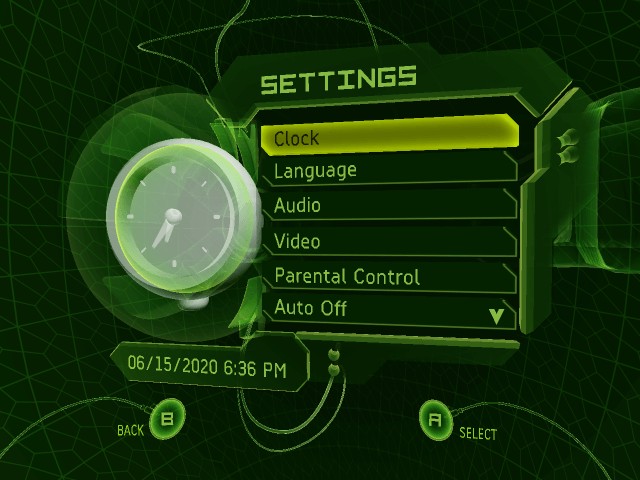
Settings screen.
The dashboard is not very different in terms of functionality compared to the PlayStation menu, or the GameCube's IPL. It essentially includes all the functions typical users would expect, like being able to tweak some settings, moving saves around, playing DVD movies or CD audio; and so forth.
One thing worth mentioning is that the Dashboard also allows to rip music from an audio CD and store it in the HDD. This music can be subsequently fetched from any game to 'personalise' its soundtrack. Far out!
Updatability
Well yes, this is the first console of its generation to be officially updatable, but only the contents of the HDD are writable. The Kernel part (in the Flash ROM) can't be re-written, but the system can patch it after it's loaded in memory. Kernel patches are therefore stored in the HDD.
Updates are distributed through retail games and/or downloaded by the system after connecting to the Xbox Live network service (more about it later on).
Some updates enhanced the functionality of the system. For instance, the first Xbox units didn't include Xbox Live, so games embedded the required files in the form of an update to install that service. Other updates focused on fixing security vulnerabilities.