As we've seen before, the graphics processor resides in the NV2A chip and, just like MCPX, it is manufactured by Nvidia.
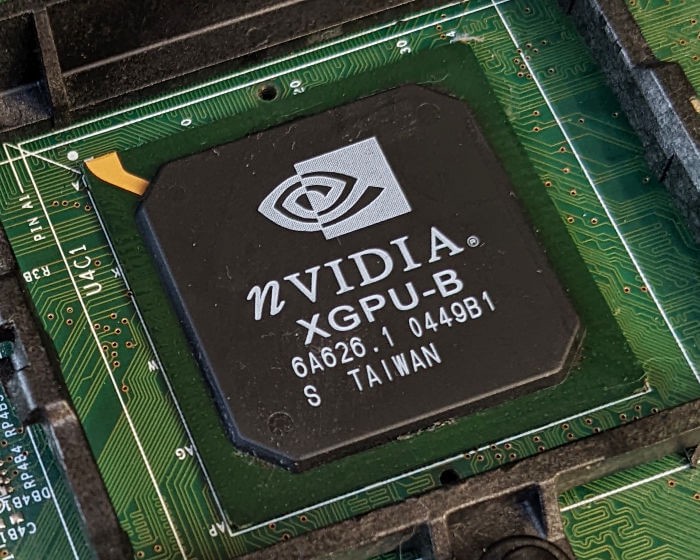
The Nvidia NV2A package on the Xbox's motherboard.
This company has been in the graphics business for a long time, their GeForce series are one of the most popular GPU brands in the computer market, directly competing against the Radeon series from ArtX/ATI. Overall, this provides good leverage on the quality of graphics found in the Xbox, considering it's Microsoft's first attempt in the console market.
It all seems reasonable, but was it really a certain decision to make back then? It's easy to rely on present history to find out why Microsoft chose Nvidia over other popular brands from the time (3dfx, PowerVR, S3, etc), but if we read more about the competition back then, the panorama of options made it much more complex.

Halo (2001) running on the Xbox in 720p mode.
For instance, 3dfx's popular 'Voodoo 2' series had ~70% of the market share in the PC market by the end of the 90s , while Nvidia was struggling to promote adoption of the new 'GeForce 256' (the first of the GeForce series). After this, Microsoft's choice now sounds more like a risk than a safe bet, but as we know by now, this risk eventually paid off.
Nvidia was NOT the #1 player they are now, in 1999. They were in trouble. The new GeForce architecture was still young and lots of people didn't like it. Now it seems forgone. But you'd need to research that history to know that, and why I had to fight to use it. I was right but I didn't know I was right; I was very worried.
- Seamus Blackley (Co-author of the original Xbox)
In the following section, we'll examine the inner workings of this chip. Now, I'm afraid we find ourselves mixed in a lot of terminology and marketing terms just like the CPU section, but fear not! I'll start with the basics.
Architecture and design
The GPU core found on the NV2A is based on the popular 'GeForce3' series of GPUs , it's also referred to as NV20 in Nvidia's technical documents.
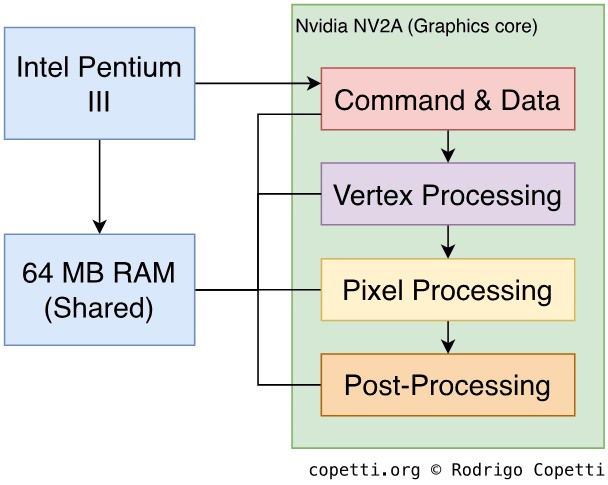
Pipeline design of the NV2A.
Please note that, while the pipeline of the Xbox's GPU is based on the NV20 architecture, the NV2A has some modifications that are not compatible with the rest of the NV20 series (most importantly, it has been adapted to work in a UMA environment).
The units analysed contain a lot more features that go beyond the scope of this article, so I recommend checking out the sources/references if this section catches your attention. Also, since graphics-related terminology is constantly evolving (which can lead to some confusion), I've decided to rely on the terms used by Microsoft/Nvidia during the years of the Xbox, so remember this if you plan to read more graphics-related articles from other sources.
Having said that, let's take a look at how frames are drawn in the Xbox. Some explanations are very similar to GameCube's Flipper, so you may benefit from reading that article as well in case you struggle to follow this one.
Commands
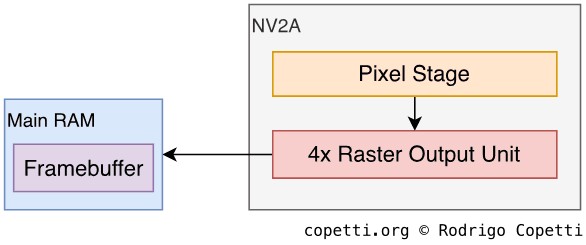
Commands stage.
First and foremost is explaining how the GPU can receive commands from the CPU. For that, the GPU contains a command processor called PFIFO that effectively fetches and processes graphics commands (called Pushbuffer) in a FIFO manner, the unpacked commands are subsequently delivered to the PGRAPH (the block in charge of graphics processing) and other engines.
Like Flipper, geometry doesn't have to be embedded in the command. PGRAPH provides many ways to submit graphics data. For instance, the CPU can allocate a buffer in RAM containing vertex data and then instruct the GPU to fetch them from that location. This approach can be efficient, as it prevents sending duplicated geometry.
The next explanations happen in PGRAPH.
Vertex
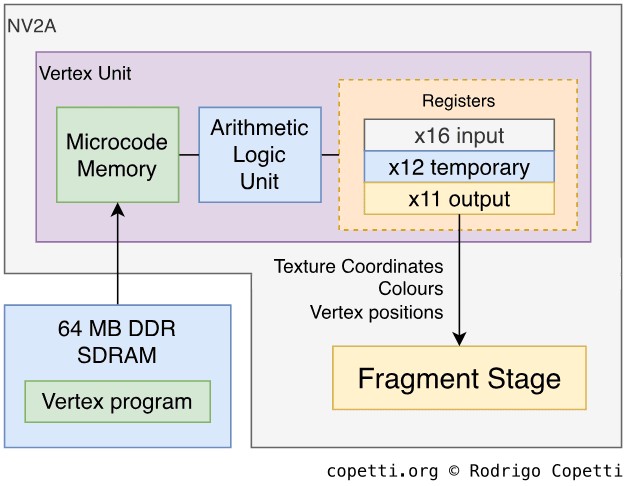
Vertex stage.
This is an interesting section for this GPU in particular. At this stage, the GPU provides the ability to apply vertex transformations to our geometry. We've already seen this feature with Flipper, but unlike that GPU, this one uses a programmable engine. This means that developers may specify which vertex operations are performed and how, as opposed to relying on a predefined program. Although, the NV2A can also operate in 'fixed' mode, if required.
This stage is handled by a Vertex Unit and the NV2A features two of them. Each can load a program containing up to 136 instructions (also called microcode). This program is referred to as vertex program and it's loaded at runtime. A vertex program can perform the following operations :
- Arithmetic operations (i.e. addition, multiplication, minimum, etc).
- This includes 'helper functions' to assist graphics-related tasks, such as dot product.
- Vertex Swizzling (Rearrangement and/or duplication).
In a nutshell, the vertex unit processes vertices by manipulating them in its registers. In other words, once the program is loaded, 16 read-only registers (called 'input registers') are initialised with the attributes of a vertex (each vector contains four components). Afterwards, the unit performs the set of operations (instructed by the program) using the input registers. Furthermore, 12 writable registers and up to 196 constants are provided to assist the computation. Finally, the resulting vertex is stored in another block of 11 writable registers (each one limited to a specific purpose), which are passed on to the next stage. This process is repeated for every vertex received.
Pixel
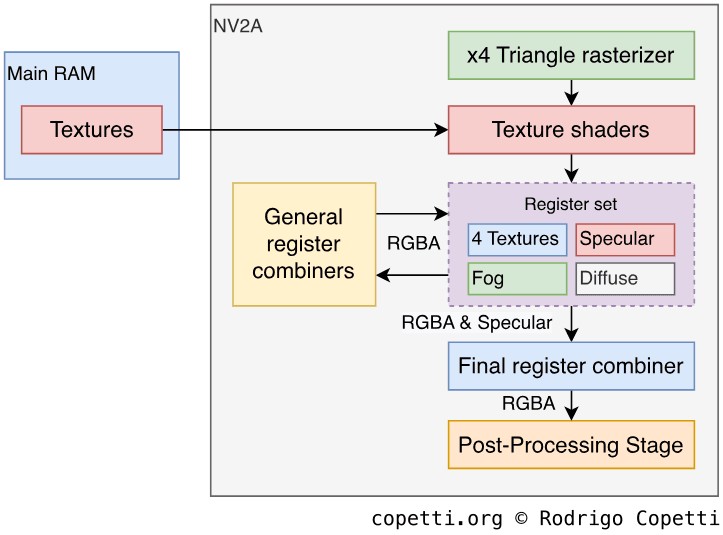
Fragment/Pixel stage.
At this stage, vertices are transformed into pixels. The process starts with a rasteriser that generates pixels to draw each triangle. The NV2A's rasteriser can generate four pixels per cycle.
Afterwards, 4 texture shaders are used to fetch textures from memory , these also offer to automatically apply anisotropic filtering, mipmapping and shadow buffering. The latter one is used to test whether a pixel is visible or overshadowed by the lighting source, so the correct colour can be applied. At this point, the GPU also offers to perform clipping and an early Z-test (the NV2A compresses the Z-buffer four times its original size to save bandwidth, contributing to a lot of performance improvements).
The resulting pixels are stored in a set of shared registers and then cycled through 8 register combiners, where each one applies arithmetic operations on them. This process is programmable with the use of pixel shaders (another type of program executed by the GPU) . At each cycle, each combiner receives RGBA values (RGB + Alpha) from the register set . Then, based on the operation set by the shader, it will operate the values and write back the result. Finally, a larger amount of values are sent to the final combiner which can exclusively blend specular colours and/or fog.
Register combiners are programmable in a similar nature to the Texture Environment Unit. That is, by altering its registers with a specific combination of settings. In the case of the Xbox, the PFIFO reads pushbuffers to set up PGRAPH, which includes the register combiners and texture shaders.
Post-processing
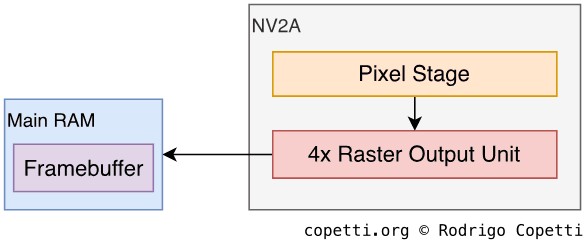
Post-processing stage.
Before the pixels are written to the frame-buffer, the NV2A contains four dedicated engines called Raster Output Unit or 'ROP' which perform necessary tests (alpha, depth and stencil) using allocated blocks in main memory. Finally, batches of pixels (four per cycle) are written back only if they pass these tests.
Moreover, the frame-buffer can be anti-aliased using a technique called multisampling . Essentially, this technique samples the edges of polygons multiple times with different offsets added in the process. Afterwards, all samples are averaged to form the anti-aliased image. This approach replaced the previous (and more resource-hungry) anti-aliasing function called 'supersampling', used by previous Nvidia GPUs.
The importance of programmability
I find it pivotal to emphasise the significance of the new programmability model that Nvidia provided to developers. Years ago, most of the graphics pipeline was computed by the CPU, leaving the GPU to accelerate rasterising operations. With the introduction of 'shaders' (referring to both pixel shaders and vertex programs), programmers can take advantage of the resources of the GPU to accelerate many computations in the pipeline, offloading a great amount of work from the CPU.
The concept of 'shaders' was introduced by Pixar in 1989 as a method to extend Renderman , their pioneering software used for 3D rendering. This was back in the time when 3D graphics were mainly handled by industrial equipment. Later on, we saw how certain consoles incorporated similar principles, but it wasn't until Nvidia released their GeForce3 line, that shaders became a standard in the consumer market.
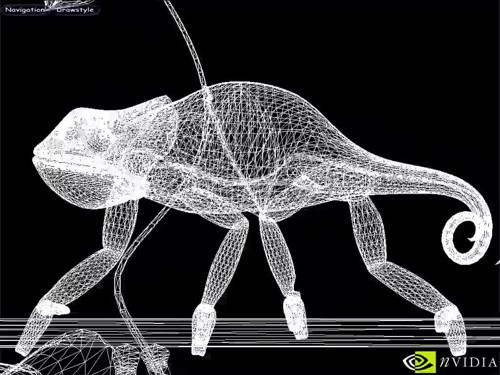
(Video) Complex animation achieved by vertex program.

(Video) Different texture effects achieved by pixel shaders.
Thanks to vertex programs, the GPU can now accelerate model transformations, lighting calculations and texture coordinate generation. The latter is essential for composing Higher Order surfaces. With this, the CPU can concentrate on providing better physics, AI and scene management.
In the case of pixel shaders, programmers can manipulate and blend textures in multiple ways to achieve different effects such as multi-texturing, specular mapping, bump mapping, environment mapping and so on.
A new programming concept that emerges thanks to this approach is the General Purpose GPU or 'GPGPU', which consists of assigning tasks to the GPU that would have been exclusively done by the CPU. So not only the GPU has taken over most of the graphics pipeline, but now can act as an efficient co-processor for specialised computations (i.e. physics calculations). This is a new area that will evolve as GPUs become more powerful and flexible. However, the NV2A was already able to achieve this thanks to a combination of hardware capabilities (vertex & pixel shaders) and specialised APIs developed (OpenGL's 'state programs').
I have a feeling that shaders will be regularly revisited in future articles. Please remember that in this article, however, they may be considered a bit 'primitive' and some people may argue that the pixel shaders are not even 'shaders' (compared to what GPUs offer nowadays).
The Xbox's frame
The standard resolution of games is 640x480, this is pretty much the standard in the sixth generation. Although, this constraint is just a number: The GPU can draw frame-buffers with up to 4096x4096, yet it doesn't mean the hardware would provide acceptable performance. On the other side, the console allows configuring its screen setting globally, which may help to promote pioneering features (i.e. widescreen and 'high resolution') instead of waiting for developers to discover them (as it happened with the Gamecube/Wii).
The video encoder, on the other hand, will try to broadcast whatever there is on the frame-buffer in a format your TV will understand. That means that widescreen images will become anamorphic unless the game outputs in HD (i.e. 720p or 1080i, which only a few games do).
That being said, what kind of signals does this console broadcast? Quite a lot. Apart from the typical PAL/NTSC composite, the Xbox offers YPbPr (requiring an extra accessory to get the 'component' connectors) and RGB (both SCART and VGA compliant). All in all, very convenient without requiring expensive adapters and whatnot.