This part may be a bit confusing, mainly due to the lack of low-level documentation compared to other consoles. It seemed that Microsoft/Nvidia really wanted developers to use their libraries and forget about everything else. It's an interesting strategy nonetheless.
In any case, I tried to document it as informative as possible, without going into too much depth.
Development ecosystem
Game development in this console is very complex in terms of libraries, terminology and so forth. So I have separated it by frameworks.
Hardware Abstraction
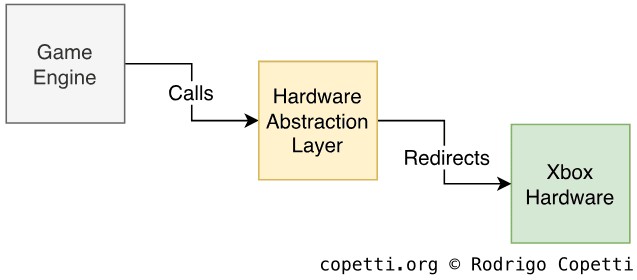
Representation of HAL.
We have seen how elements like a 'programmable coprocessor with microcode' tend to come with a lot of fanfare at first, but slowly dissipates once developers discover the real complexity of the new hardware.
From the developer perspective, I think one of the selling points of this console was the inclusion of popular high-level libraries that could efficiently manage low-level functionality. Microsoft and Nvidia's strategy consisted in, instead of documenting every low-level aspect of their hardware, they just provided a fully-functional hardware abstraction library that could perform the operations developers would expect to find without requiring complete knowledge of the inner workings of the hardware.
There are multiple SDKs available to develop for this console, some 'official' and restrictive, while others 'not-so-official' but flexible. We'll take a look at the most popular ones.
Microsoft XDK
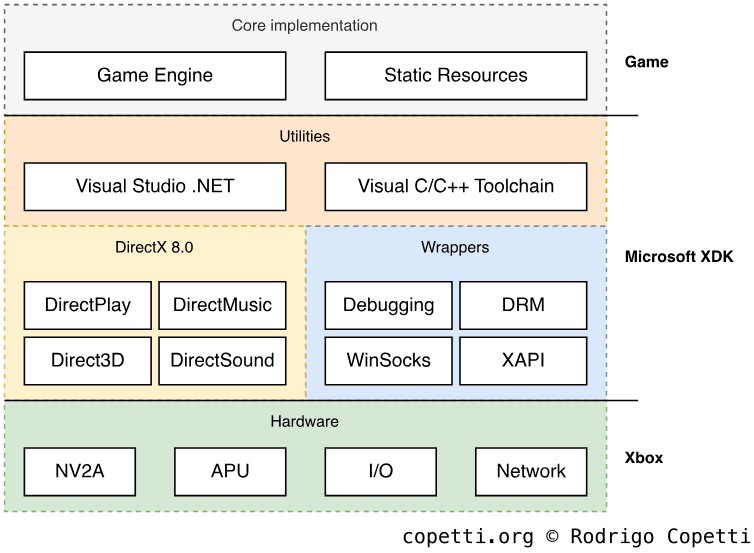
XDK structure
Microsoft's Xbox Development Kit or 'XDK' is the official SDK used for Xbox development. It's a package that contains many tools, libraries and compilers. Most notably, it's used alongside Visual Studio .NET (2002 version) which was quite an IDE from that time, for better or worse.
The graphics library is a customised implementation of Direct3D 8.0, which was extended to include Xbox-specific features. Direct3D was a very powerful API used to develop code compatible with many GPUs. With this, PC developers have the opportunity to port their PC games without too many changes (in theory!). Although, the syntax used for vertex programs and pixel shaders resembles downright assembly.
Apart from that, audio functionality is provided by DirectSound which takes care of the APU without the need to worry about moving audio data around. There are some network libraries as well, which are very convenient for achieving online functionality (i.e. multiplayer). The network API relies on Windows Sockets, which was Microsoft's attempt to simplify network communications using a Windows-only protocol (albeit having a design based on its standardised counterpart, BSD sockets).
To try all of this out, Microsoft distributed their own development kit hardware which is just a retail unit tinted in green with double the RAM installed (128 MiB in total) and, sometimes, a different MCPX chip (called MCPX-2, which directly boots from the Flash ROM). It contains an enhanced version of the dashboard which launches executables signed by the XDK. On the other end, the Xbox Neighbourhood (a Windows application) was used to link the dev kit with Visual Studio, enabling easy deployment and debugging. To experiment with Xbox Live, Microsoft provided sandboxed servers as well.
NXDK
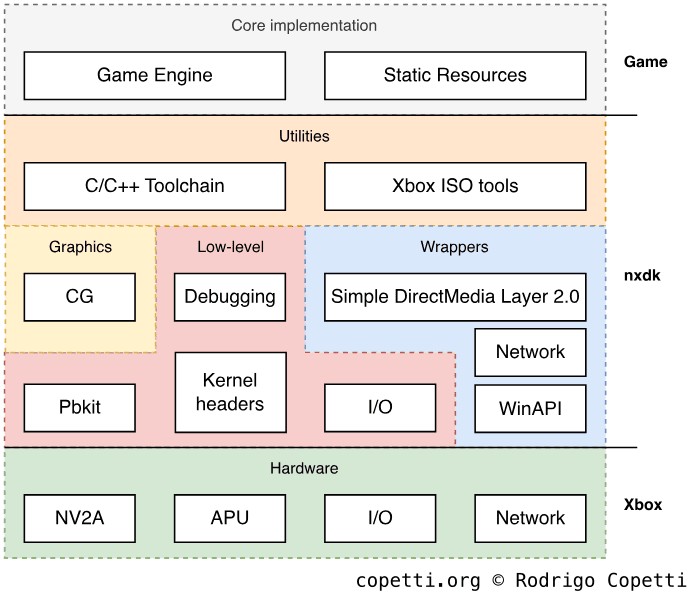
NXDK structure. Notice that even though some low-level libraries are wrapped with high-level ones, they are still accessible to the developer
To avoid Copyright litigation to Homebrew developers using the official SDK, a group of developers unaffiliated with Microsoft created a replacement of the official SDK called Open XDK. After some years, its development stopped, so another group picked it up from there and named the new fork New XDK or 'nxdk'.
The ongoing project reverse-engineered the low-level hardware components (microcode, push-buffers, etc) and designed a new API in C/C++ which provides high-level calls to each portion of the system.
To simplify the graphics layer without relying on Direct3D, nxdk uses the CG compiler . CG is a language created by Nvidia for developing shaders. CG is chained with other compilers to generate Xbox-compatible code. During compilation, CG code is converted into NV20-compatible assembly, then, this is translated again using a custom compiler to generate NV2A-compatible microcode and pushbuffer. For those who don't want to use CG, nxdk also exposes the rest of the compilers to write low-level shaders.
The rest of the APIs available handle other services (audio, networking, etc). All in all, this library gives more control of the hardware (as opposed to the official SDK) at the exchange of not using Microsoft's APIs (the de-facto standard, albeit completely proprietary). However, nxdk remains the most adequate option for developing legal Homebrew programs.
Medium
Games are distributed on dual-layer DVD discs (with up to 8.5 GB!), and they are subsequently read by a customised DVD drive that includes anti-piracy protections (despite using a standard interface, ATA). It's worth mentioning that the XDK included some tools to customise the layout of data in the disc, enabling programmers to improve read speeds!
Now, the console also includes an internal 8 GB HDD, games use it to store saves or cache temporary content. The system, on the other hand, stores the dashboard, Xbox Live settings and network settings.
Network service
Forget about modems or experimental services. The Xbox included everything that nowadays we take for granted to provide a decent online service: Ethernet connection and a centralised online infrastructure (called Xbox Live).
Xbox Live Logo.
Furthermore, not only Xbox Live enabled online multiplayer but it also included other features like audio streaming for real-time voice chat.
But what exactly is Xbox Live? Well, it's just a collection of interconnected online services that companies can use to build their online platform. For instance, one of the services provides user profiles, so studios can use it as an authentication method when accessing the online functionalities of a game. In the official SDK, Microsoft includes some APIs to talk with the Xbox Live servers.
It's important to point out that Microsoft controls whom to grant Xbox Live access to, so developers will have to register with Microsoft to obtain the authentication keys that will be used by their games.
The real online experience happens in the Title Server, which is the type of server that answers to clients (Xbox consoles) around the world and handles real-time communication. Microsoft included in their SDK some samples to show how to build these servers, although they relied on Windows systems and were meant to be deployed in data centres running Windows Server.
The start of a new trend
After analysing Microsoft's implementation of Xbox Live and looking at the impact it had on the industry. It now sounds pretty obvious, right? As if the recipe for 'proper online gaming' (a.k.a Ethernet + Infrastructure) was always there, but not every company wanted to invest in it.
It turns out it's not that simple: Microsoft also had to convince users they 'needed' this functionality, that online multiplayer wasn't just an optional addition, but a fundamental part of some games. Otherwise, Microsoft's efforts would just account for another 'online attempt'.
Try imagining a world where no console gamer wanted online games, and where nobody believed a PC architecture could be a console. That was really how it was. Now it seems obvious BUT IT WASN'T.
- Seamus Blackley