Following in the footsteps of the original Xbox, all I/O operations are handled through a thick and opaque chip called Southbridge (though in various documents I've seen it referenced as 'I/O chip' or 'XBS' as well). The Southbridge connects to most, if not all, internal and external interfaces. This chip is only connected to the GPU (not the CPU), so Xenon has to go through Xenos to reach it and subsequently request data from any socket.

The Southbridge chip supervising small I/O chips and sockets.
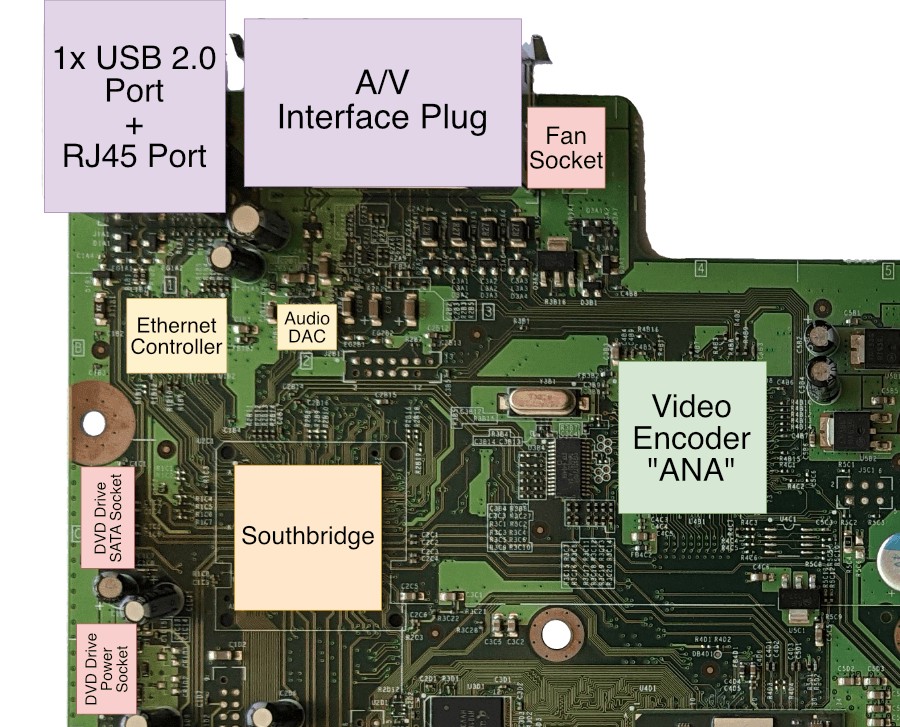
The same picture with important parts labelled.
The Southbridge communicates with Xenos using the PCI Express protocol, composed of two unidirectional serial buses, one for each direction. In the case of this console, each bus can transfer up to 500 MB/sec .
Clever L2 access
To keep up with the demand, the Southbridge can write to main RAM. Consequently, there needs to be a mechanism in place to maintain data coherence between the CPU's caches and the changes done by the Southbridge. Hence, the latter is equipped with an automatic trigger that flushes the CPU's L1 and L2 if, and only if, the memory address the Southbridge wrote to had been cached by the CPU. Nevertheless, the CPU will have to cache that memory again, though programmers won't need to worry about manually synchronising the CPU caches every time the Southbridge fiddles with main RAM.
The core of Southbridge
You've seen before that the abundance of services in 7th generation consoles has led to the inclusion of many black boxes. These are meant to offload most of (if not all) the security and I/O tasks away from user-accessible components like the CPU and GPU.

Diagram of the Southbridge's connections.
The Xbox 360 is no stranger to this. Hidden within the Southbridge chip there's a component called System Management Controller (SMC) and, like the Wii, it draws current even on standby mode. The SMC abstracts lots of I/O operations, including power management, real-time clock, temperature control, LED control and the infrared sensor . The CPU communicates to the SMC using a First In, First Out (FIFO) command buffer, though this task is restricted to the Kernel only (more about it in the 'Operating System' section). So, neither the user nor the game can fiddle with it.
Internally, the SMC is nothing more than a classic Intel 8051 microcontroller with its own ROM and RAM . Upon getting power, it boots its internal program and proceeds to read from a separate NAND chip to fetch configuration files.
There are other interesting aspects of the SMC, but we'll discuss them in due time (don't worry, I'll be waiting in the 'Anti-piracy' section...).
External interfaces
The set of external ports is not particularly overwhelming, but there are a fair number of them.

Front view of the console, some interfaces are hidden by spring-loaded doors.
In any case, the console offers:
- Three USB 2.0 A sockets: one is found at the back of the console and it's meant to connect to an external accessory (like an official Wi-Fi module) that Microsoft sold separately. The other two are on the front and can be used to connect wired controllers.
- With the arrival of the 'Slim' Xbox 360 model in 2010, an internal Wi-Fi card has since been bundled with (internally connected with USB as well) and two more USB sockets were added on the back.
- A special socket (combining USB and proprietary interfaces) for the RF module, also known as the front panel that lights up when the console turns on. This component also handles the communication between the wireless controllers (through a proprietary wireless protocol) .
- Two Memory Unit ports: these are mangled USB ports that fit a Memory Unit, a proprietary Memory Card of up to 512 MB of size .
- An RJ45 port for Ethernet connectivity.
- Infrared Receiver to capture infrared light sent by an Xbox-themed remote controller (an optional accessory).
- One SATA II socket: mixed with power lines (resulting in a proprietary socket) and exposed at the top of the case (if the console is placed vertically) to connect the optional external hard drive.
Wired with a chance of Wireless
While Sony went straight for wireless controls using Bluetooth technology, the Xbox 360 shipped with different kinds of controllers depending on the 'edition' purchased (this doesn't necessarily affect the motherboard revision, only the amount of accessories bundled with the box).

The new wireless controller/gamepad . Two AA batteries are fitted on the back.
As you may guess, wireless controllers were only given out with the posh 'premium' editions, while the low-end & HDD-less 'Arcade' model shipped with a single wired controller (this time, using a standard USB A cable). Wireless controllers required two AA batteries, though Microsoft also sold a rechargeable battery block.
The console can handle four controllers at the same time, whether wireless or wired, but note that the console only provides three user-accessible USB ports.
Compared to the old duke, the controller doesn't take two memory cards anymore, but it keeps the headphone jack (2.5 mm TRS type). The wireless model has a special socket on the front to plug the 'Play and Charge' cable, an optional accessory to connect wireless controllers to the console and charge the battery at the same time. The cable uses a proprietary bus layout composed of USB-compliant pins with additional undocumented ones .
Internal interfaces
These are the interfaces that the Southbridge handles to interconnect chips within the motherboard:
- One SATA II socket to plug the internal DVD drive.
- A proprietary 8-bit bus to communicate with a 16 MB NAND Flash chip.
- Another proprietary bus to talk to the Audio DAC.
That interactive accessory
I don't tend to give too much attention to accessories because they deviate from the main focus of the article, but there is one special case where Microsoft dedicated an obsessive amount of marketing effort. They were even convinced that 'gamepads are a thing of the past' and it's only a matter of time before this new product would eradicate current user interaction methods.
Well, that didn't happen, but Kinect is still worthy of study. Released in November 2010 with huge fanfare, Kinect is a sensor bar (very different to the Wii's sensor bar, Kinect's 'competitor-slash-inspiration') that captures the user's position, movement and voice in an effort to provide control of the game without requiring any physical object in the user's hands.

The Kinect bar, released in November 2010 .
The construction of this device isn't anywhere simple, and as such, the sensor carries many forms of technologies:
- An RGB camera to capture images of the room and the player .
- A IR emitter and IR sensor that projects IR light and captures its reflection, respectively. This allows deriving a z-buffer of the room, thereby identifying the depth of objects.
- A microphone that listens to the player.
- A chip salad that handles the sensors and signals to produce meaningful data from it. This includes 64 MB of DDR2 SDRAM (as a working area), 1 MB of Flash memory (where the main program is stored), a Marvell AP102 SoC (presumably containing the main CPU inside) and a PS1080-A2 DSP (to process the image coming from the cameras), among others. All of this is fitted on three different boards stacked together .
The sensor is operated through the use of Microsoft's opaque APIs, which in turn communicates to super-secret software installed on both the Kinect and the Xbox 360's Operating System. The Kinect uses a USB 2.0 A connection to plug into the console. The 'Slim' re-design of the Xbox 360 released in the same year was also branded 'Kinect compatible' as it could supply power to the bar as well (with the provision of an extra proprietary port on the back of the console), older models require a separate power brick for the Kinect.