What if I tell you there are a total of four operating systems stored in this console? Two of them run in 'Wii U' mode, while the other two are only used for backwards compatibility.
As this topic can get very confusing, let's start with the native Wii U-only systems.
With age comes wisdom
Just like in the original Wii, the Wii U runs two OSes concurrently, one in the CPU (Espresso) and another one in the I/O processor (Starbuck). However, both have been designed with thicker layers of abstraction and a more sophisticated security model. Hence, Wii U games do not run on bare metal anymore.
Starbuck's improved OS
To start with, Starbuck's operating system is now called IOSU (another name given by fail0verflow, meaning IOS + Wii U) and you will only find one variant of it. This means there're no more update slots, although there's an alternative IOSU referred to as 'IOSU255' which is only loaded when installing system updates.
IOSU is still composed of a multi-threaded microkernel, which is now able to allocate up to 180 threads (previously 100), along with drivers and modules to take care of I/O access and security.
One interesting aspect is that Starbuck disposes of two secured memory blocks for loading its kernel: Its internal 96 KB of SRAM and 3 MB of 1T-SRAM (known as 'MEM0') from the Wii GPU block. This is for performance and security reasons, as it prevents Starbuck from being exposed to tampering and reduces congestion.
Espresso's new OS
First things first, Espresso now runs an actual operating system. That's the most obvious change considering Wii games run on bare metal. This is called Cafe OS and it's made of multiple components, not necessarily stored in the same medium :
- A bootloader that bootstraps the system.
- A Kernel that provides a layer of abstraction between the hardware (in this case, through Starbuck) and applications. In doing so, it runs under the highest privileges of the CPU and provides many low-level functions (memory management, security, etc). Curiously enough, this component runs on the middle core (Core 1) as it provides more cache .
- User applications that run on top of the Kernel and provide functionality for the user. This includes the interactive shell, the game and other applications installed.
Moving on, the Kernel runs in supervisor mode and communicates with Starbuck using the same Inter-Process Communication (IPC) channel that the Wii relied on. This component can load multiple programs (processes) in memory, but it's very limited in the number of processes it can run simultaneously (especially if they require foreground capabilities), I'll talk more about it in a bit.
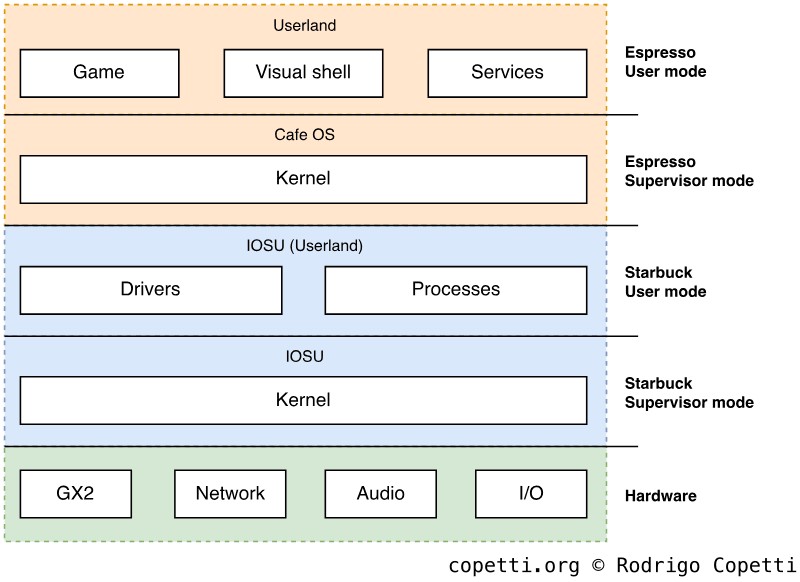
Overview of the privilege levels in the Wii U, after combining both operating systems.
Cafe OS loads system and user applications using a proprietary binary structure called 'RPL', which is used for both executables and libraries. Moreover, the main executable is referred to as 'RPX'. One of Cafe OS' utilities, Loader, takes care of loading them up into memory (with the cooperation of IOSU) and executing them. Loader also performs dynamic linking to connect references of Cafe OS in the program with the physical Cafe OS installed in the console. Finally, applications are installed in the form of 'channels' which later show up in the 'System Menu' (the interactive shell).
Due to the way the Kernel organises the memory layout, the user is only able to run up to two types of programs at the same time. One is the 'foreground' program with the most amount of memory available (i.e. the game) and the other is a 'background' app with significantly less memory allocated (i.e. the web browser). The user may switch between the two without having to close either, but only one can be displayed at a time and, again, there can only be one 'foreground' and one 'background' app loaded. Otherwise, either gets closed/deallocated.
The big cost
It's time to address something that may sound a bit outrageous: Cafe OS consumes 1 GB to run, that's half of MEM2 that was supposed to be available for games. This means that the Wii U, having featured the immense amount of 2 GB of DDR3, only grants 1 GB to the most important application that users care about.
In my humble opinion, this is a real disappointment, especially considering an operating system like Mac OS X 10.4 "Tiger", which also runs on similar PowerPC CPUs, provided a more sophisticated set of features and only asked for a minimum of 256 MB of RAM. Even so, game console manufacturers tend to design their operating systems so they consume the least amount of footprint possible, and it seems Nintendo couldn't fulfill that requirement this time. On a curious note, it was even reported that Nintendo planned to ship new versions of SDKs and software updates that would reduce memory consumption from the OS side. Yet, here we are, with its successor already in stores and no further production of Wii Us in sight. Oh well!
Be as it may, there's a slight compromise: 'foreground' apps may claim an extra 40 MB as long as they are being displayed (a.k.a shown in the foreground). However, as soon as the user switches to a background app, this block gets automatically deallocated. This is not exactly a 'simple' feature, leaving it up to developers to find good use.
Maintaining traditions
It all changes when a Wii game is played, as the Wii U enters a state called 'Virtual Wii' (vWii). There's no emulator present, but re-shuffled hardware that makes Wii games think they are running on the original platform.
To enter vWii mode, Starbuck executes a program called cafe2wii that takes care of morphing the console into a Wii (a.k.a de-activating all the modern features) . Now, there are different sets of binaries available to use (each with a variant of cafe2wii), specifically, OSv0 and OSv1. The choice depends on the type of vWii mode needed. In summary:
- Normal vWii launches the good-old System Menu, exactly what a real Wii does after pressing the power button. This is useful for playing a disc-based Wii game or for launching any channel installed.
- HAI vWii directly launches a Wii game (bypassing the System Menu). This is used for executing Wii games bought from the Virtual Console store. Hence, the Wii game may be installed in the Wii U's dedicated storage (eMMC or external USB).
Luckily, not all the modern hardware in vWii mode is wasted, as the GamePad can turn into a mirrored screen with a controller as well. If that's not enough, the front of the GamePad contains infrared lights that behave as a sensor bar, so Wii Remotes don't require a TV at all.
Just like with any Nintendo console with backwards compatibility, once in Wii mode, the only way back is by rebooting the console.
Storage Medium
The Wii wasn't shy in providing multimedia-centred storage options (the SD card was a nice addition). And so, the Wii U builds on top of that.
Having said that, let's now see what storage options are spread throughout this console:
Boot ROMs

Within this complex package, there are two hidden ROMs storing boot code in plain form.
The 6th generation cemented the concept of an operating system in a video game console. Yet, the appliance was still exposed to the vulnerabilities resulting from combining off-the-shelf components with in-house ones. As console manufacturers couldn't tailor the design of third-party chips, custom security components had to reside in separate locations within the motherboard, thereby being exposed to tampering and reverse engineering.
With the 7th generation, IBM presented a new range of PowerPC CPUs that embedded a hidden mask ROM within the silicon. This enabled the PlayStation 3 and Xbox 360 to house sensitive code in plain form (as CPUs only understand unencrypted code) without fear of being read by hackers. That being said, it's now the turn for the Wii U so IBM also had something prepared for it: Inside Espresso, there is a hidden 16 KB of ROM connected to one of the cores. This is used as the first boot stage of Espresso and, once it's been executed, it makes sure subsequent binaries are approved by Nintendo.
Combined this with Starbuck's own 4 KB of Boot ROM (inherited from the previous Wii model), you've got two CPUs enforcing Nintendo's security model as soon as they start up.
Sensitive ROMs
Nintendo also bundled other ROMs scattered around Latte containing very sensitive information.
The first one is 1 KB of One-Time-Programmable (OTP) memory where many encryption keys are stored. This memory was also found on the Wii but in a smaller size (128 Bytes). OTP stores the information used to encrypt/decrypt data and verify the integrity of existing data . It also stores flags for enabling/disabling low-level functionality of the motherboard (i.e. JTAG). Additionally, OTP is segregated between Espresso's bank and Starbuck's one , as both will need to read different keys and subsequently lock OTP access at different points in time.
The second is 512 Bytes of SPI EEPROM (SEEPROM) which is writable (albeit not all of it is edited) and houses many configuration flags and miscellaneous meta-data . Some data in SEEPROM is encrypted with keys found in OTP memory.
Diversified NAND

NAND chip providing 1 GB of storage.

eMMC chip providing 8 GB of storage (in this example).
Having talked about the low-level part of the system, let's take a look now at where the 'visible' part is stored. There are two storage spaces found on the motherboard:
Firstly, we've got 1 GB of NAND divided into two banks:
- The first 512 MB store the Wii U's operating system (later-stage bootloaders and Cafe OS).
- The second 512 MB house the software that makes up the Wii's operating system (System menu, IOS slots and channels) except the original bootloaders.
Secondly, either 8 GB or 32 GB of embedded MultiMediaCard (eMMC) depending on the model purchased, is available for user data only (downloaded titles, DLCs and game updates). Remember this may also include Wii titles downloaded from the Virtual Console store (which can only be launched from the Wii U's System Menu).
Extra storage

Typical external HDD connected to a USB Y cable so it works on the Wii U.
For those users that run out of space pretty quickly, the Wii U came with support for external USB storage out-of-the-box. The only limitations, however, are that the medium will have to be formatted using the Wii U's proprietary file system and only user data can be stored. As a side note, the Wii U's USB ports only output up to 500mA of current , which ironically is not enough for typical USB HDDs (around 900mA). So, users had to resort to USB Y cables to combine the current of two USB ports.
Moving on, there's also an SD card slot, but that's only taken advantage of by certain programs and games that store exchangeable multimedia (such as images). Luckily, it supports FAT32 so no formatting will be needed.
Boot process
Having two independent CPUs can be difficult the setup. Still, Nintendo is no stranger to this practice. So, how does the Wii U manage to coordinate Espresso and Starbuck so the console ends up running an interactive shell on top of a secured environment? Let's take a look.
Multicore chaos
Before we start I want to address the same problem that was present on other symmetric architectures like the Xbox 360: Symmetric cores must be coordinated so each one doesn't take over the system at the same time. Well, Espresso adopts similar practices to x86, where only one core is activated upon switching on the CPU. Then, it's up to the program loading in the master core to wake up the other two .
Nonetheless, all cores contain the same reset vector. Consequently, the program is responsible for asking itself which type it is running from and then proceed based on the answer. This modus operandi is similar to ARMv7.
Boot procedure
It's time to see the boot routines and, let me tell you, they are not particularly simple. After all, it's two independent processors with their unique security model being initialised in a serialised way, so that requires a lot of coordination. For simplicity's sake, my summary is somewhat shortened to avoid feeding you up with lots of information, so don't forget to check out the citations if you are curious for more.
On the other side, you don't need to completely understand this to follow the rest of the article, so feel free to move on if it's not your area of interest!
Alrighty, let's begin already. Once the user presses the power button, the following happens :
- Starbuck wakes up and proceeds to...
- Execute code found in its reset vector (
0xFFFF0000) , which points to its mask ROM (where the first boot stage,boot0, is). The first routine tells Starbuck to copyboot0into Starbuck's SRAM, so it runs faster. boot0then initialises part of the I/O and nearby blocks by reading the flags found on OTP memory and SEEPROM. It then proceeds to fetch the next bootloader stage (boot1) from NAND.boot1is encrypted and signed, so Starbuck first checks its signature (RSA type), the integrity of the content (by comparing the SHA-1 hashes) and then proceeds to decrypt it (using AES). All of the keys and certificates needed are fetched from OTP memory.- More I/O is initialised. Then, SEEPROM and part of OTP is locked down from being accessed again. Finally,
boot1kicks off. boot1initialises even more I/O and prepares MEM2 and MEM0 for use . It then transfersIOSU Firmwarefrom NAND to MEM1 and performs the same verification & decryption process. If everything went well, Starbuck disables the used OTP memory and zeroes out sensitive data. Finally, it jumps toIOSU Firmware.IOSU Firmwareis a collection of binaries. The first one launched isIOSU Loader, which moves the rest of the firmware (a.k.aIOSU) to specific memory locations (SRAM and MEM0). It then clears itself from MEM1 and jumps to SRAM, whereIOSU Kernelawaits.- The
IOSU Kernelfirst does a quick MEM1 check , but after that finishes, that's Starbuck up and running with IOSU. To perform its functions, IOSU's modules are found on MEM0. - Espresso is next, so IOSU copies
Cafe OS(in encrypted form) into MEM2 and kickstarts Espresso.
- Execute code found in its reset vector (
- The first core of Espresso powers on, then...
- The reset vector is at address
0x00000100, which at this point is masked by the Boot ROM, so it starts execution there. - MMU, L1/L2 caches and registers are cleared. Then, Espresso switches to 'Translated mode' (activates virtual memory).
- By fiddling with locked L1 cache and empty memory writes, the BootROM is copied to L1 (to run faster) without reaching external RAM.
- The reset vector becomes an infinite loop (to prevent intruders from attempting to reset the CPU).
- AES keys from OTP are copied into L1. Then, OTP is disabled.
Cafe OS Kernel's header is copied to L1 and its signature is verified using the stored keys.Cafe OS Kernel's data is hashed and decrypted by using the DMA engine to send blocks to L1 back and forth.- The now-unencrypted
Cafe OS Kernel, in RAM, is mapped and ready for execution. L1 and L2 are flushed; and the Boot ROM is disabled. Finally, execution jumps toCafe OS Kernel. - Espresso, now running
Cafe OS Kernel, checks configuration files that instruct it to launch theSystem Menuapplication. System Menuis fetched from NAND into MEM2 and processed like any other encrypted binary. If that goes well,System Menuis launched.
- The reset vector is at address
- The user is now in control!
vWii boot process
As soon as a Wii title is launched, the system proceeds with an 'extra' loader stage that turns the Wii U into a Wii. The process starts with Starbuck executing cafe2wii, which proceeds to :
- Reboot Espresso.
- Slow down Espresso and disable the two extra cores.
- Upload a firmware for the DMCU video encoder.
- Upload the old fonts into an area of MEM1, which can them be accessed from the EXI interface (to replicate the old EXI route).
- Activate a compatibility mode on the AHCI interface (where the SATA disc drive is connected to) so it can be commanded using the old Disc Interface (DI) protocol.
- Copy the keys from OTP memory to its internal SRAM, as vWii will think the internal SRAM is the legacy SEEPROM.
- Disable Wii U-exclusive I/O, except the GamePad (unless it's deactivated by the user or game metadata).
- Boot IOS. The choice of IOS slot depends on the vWii mode used and, if in HAI mode, the game.
- The IOS package for vWii has been slightly modified with additional modules. This includes
DI2SDto emulate the disc drive andOHCI1to translate the input from the GamePad into Bluetooth commands (thus, replicating the Wii Remote controller) .
- The IOS package for vWii has been slightly modified with additional modules. This includes
- Upload either the
Wii System MenuorNAND Boot Program(the binary that runs Wii titles) to MEM2, the choice depends on the vWii mode used.- As Espresso will have booted from its boot ROM first, it will only accept binaries using the Wii U's security model. Therefore, both Wii binaries have been modified to comply with this.
- Kickstart Espresso and let it process and run the designated binary.
- The user is now in control (again!).
Interactive shell
The Wii U's graphical user interface is called System Menu (or 'Wii U Menu') which, as you've seen before, it's an application launched right after Cafe OS finishes loading.
Most of the services that the Wii U offers (i.e. disc game launcher, settings, online store, etc) are found in the form of foreground applications, the user can pick either from the System Menu. On the other side, a small set of functions (like an Internet Browser) are implemented as background applications and can only be launched from the 'Home' menu.

System menu as seen from the GamePad, showing a traditional grid of 'channels' (applications) installed.

Home Menu, as seen from both screens. This one appears after the user presses the 'Home' button on the GamePad.
The System Menu interface has been designed with Touchscreen in mind. It also supports screen pointing interaction (as the Wii did) although its main controller is the GamePad.

The settings app (as seen from the GamePad) provides the controls.

The settings app (as seen from the television) serves as a visual guide.
On other news, Miis (Nintendo's signature avatars) have also been ported to the Wii U. Not many games seem to care about them, but there are many system applications that use the Miis (mainly for decoration purposes).

The new Mii editor (GamePad view).

It doesn't look like it, but this is the Web Browser app as seen from the TV (the actual browsing happens on the GamePad).
For the first time in a Nintendo home console, the GUI is multi-user, thereby requiring users to set up a System account upon first launch (similarly to Sony and Microsoft's interfaces).

The System Menu also displays information on the TV. Shown here is a town populated by Miis telling you random tips. Originally, when the Miiverse service was operational, this screen also was filled with messages coming from Miiverse's user board.
After personally fiddling with the GUI, I was surprised at how slow navigation is. The experience is not sluggish, but switching between the apps (a necessary common recurrence) takes considerable time. This may be due to the security model in place (recall the bootstrapping process of Espresso and Starbuck binaries) being required to run every single time. Plus, it seems Espresso is not particularly fast for the algorithms implemented (an overview of the security model will be explained in the 'Anti-piracy / Homebrew' section).
The legacy shell
The System Menu comes with a particular app called Wii mode. This is the one that kickstarts the old System Menu to play Wii titles. Behind the scenes, this app bootstraps the aforementioned cafe2wii binary and we've already seen how this works.

Before entering vWii mode, the system asks the user whether to keep the GamePad active (as an input device and mirror screen) or not.
Once in vWii mode, the Wii's Home Menu is also capable of altering the console's settings (i.e. the Wii Remote pairing information and settings). So, to avoid conflicting with the (native) Wii U configurations, IOSU's kernel modules take care of synchronising both settings beforehand .

The Wii System Menu in vWii Mode. Not much difference except for three new channels installed (related to the Wii U) and others removed. Take a look at the thin letterboxing produced by the video encoder trying to fit the original 480p image in a 720p/1080p signal.
vWii mode doesn't necessarily require a TV to use. If the user chooses to activate the GamePad, this will work as a display, sensor bar and 'classic controller' (an optional accessory during the Wii days). The last function, however, is only available for Wii games purchased from the eShop (part of the Virtual Console catalogue).

vWii mode with GamePad enabled, notice how my camera captured the two infrared lights being emitted by the GamePad.
Nintendo also took care of bundling new Wii U-related channels in vWii to make the user's experience a bit more enjoyable.

The new 'Wii System Transfer' channel imports the old user data (including Wii Shop purchases and points) from an old Wii to the Wii U over the network... and then factory-resets the old Wii, yikes.

The new 'Back to Wii U' channel, as the name indicates, restores the console into Wii U mode... by just resetting the console.
Finally, the settings button on the System Menu will only allow to manage save data (the 'Wii System Settings' screen has been removed for practical reasons).
Updatability
Both operating systems are very much 'updatable' with Nintendo issuing software updates online and through game discs. In doing so, new accessories can be supported, apart from improving the software and/or patching system vulnerabilities.

Screenshot of the console installing a system update.
When the updater is launched, Starbuck loads a different variant of IOSU called 'IOSU255' and proceeds to install updates from there . The update package can include both updates for Wii U and vWii mode.