When it comes to Nintendo, the controller tends to be an engaging topic of discussion. Here is no exception, so I found it more captivating to start the analysis with this component before we dive into the main box.

The GamePad (black edition).
The Wii U comes with a single wireless 'controller' (albeit nothing like seen before). It's twice the size of a traditional controller but bundles twice the functionality. Its technical name is Display Remote Controller (DRC) but users better know it as GamePad. In there, we find a touchscreen, a set of buttons, a hidden stylus and many, many sensors. All in all, it's one interesting brick.
Due to its abundance of hardware, you could consider it an independent computer by itself. However, due to its software, the GamePad ultimately behaves as a terminal linked to the console, with duties including:
- Input device by forwarding sensor data and button presses to the console.
- Output device by receiving audio and video streams from the console and reproducing them on the internal display and speakers.
- Signal processing by seamlessly encoding and decoding data streams travelling from or to the console.
In doing so, apart from being a controller, the GamePad was marketed with two functionalities in mind: A 'second screen' and a 'mirror screen'. In the first case, the console may display exclusive information on the GamePad without consuming TV space. In the other, the user may use the console without requiring a TV anymore.

The Legend of Zelda: Twilight Princess HD (2016).
The GamePad's display acts as a handy secondary screen to show the map and inventory.

Super Mario Maker (2015).
Main gameplay happens on the GamePad, the TV just acts as a 'projector'.
In practice, however, there wasn't any standardisation in place. So, the adoption of either style completely depended on how the game was programmed.
Architecture
Let's now see what the GamePad is made of, a tricky task by itself since the internals of the GamePad aren't documented whatsoever. Luckily, a hacking group called 'Memahaxx' took matters into their own hands and completely reversed-engineered the device. If that wasn't enough, they also took the time to share their discoveries with the public.
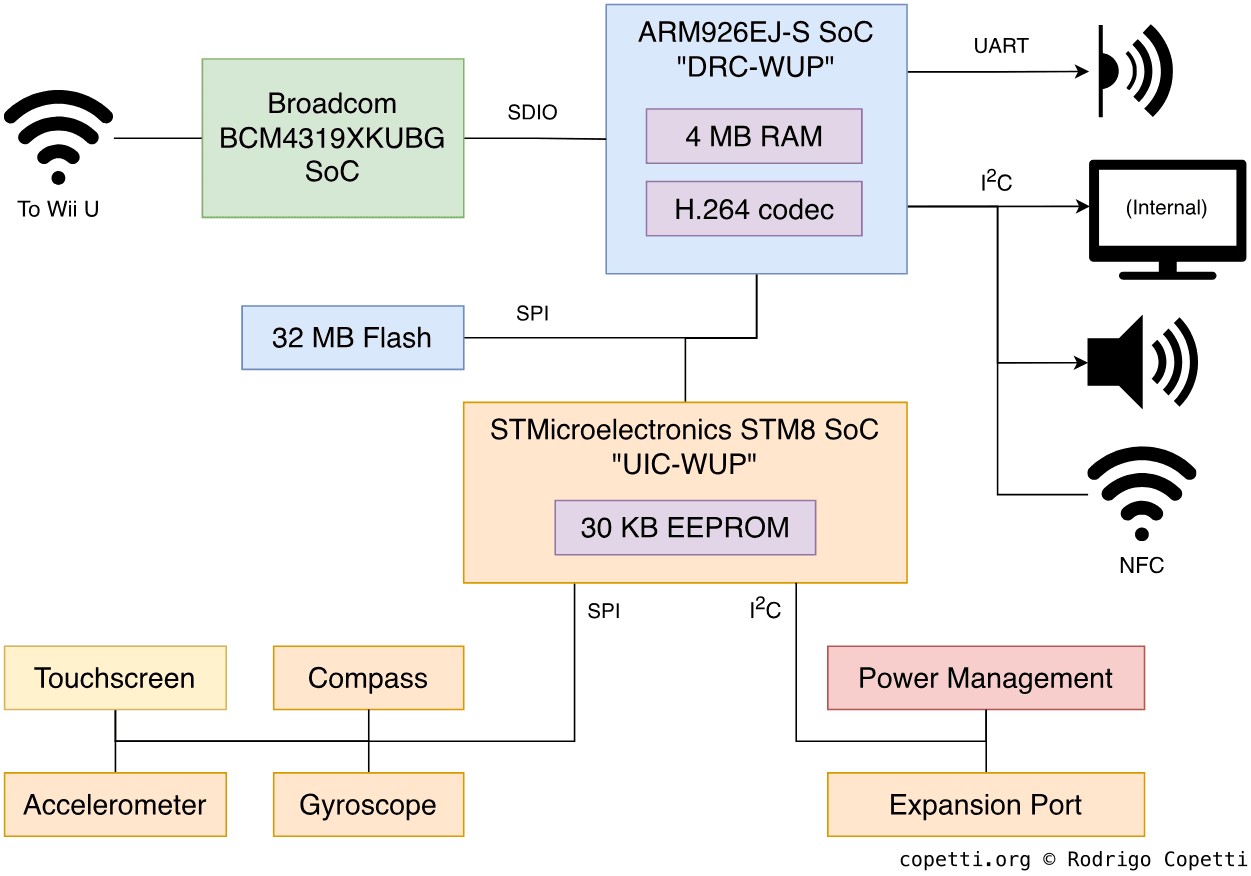
The internal architecture of the GamePad.
The device bundles three main chips or, better yet, three independent computers:
Firstly, we've got DRC-WUP which is a System-on-Chip (SoC) hiding yet-another ARM926EJ-S (the same one from the Wii, how many of these do they have in stock?) along with 4 MB of RAM and a special H.264 accelerator for encoding and decoding H.264 streams. This is the main chip that controls the peripheral. It has access to the screen, audio and NFC functionality.
Next to the SoC, you'll find the Broadcom BCM4319, another tiny computer that houses an ARM Cortex-M3 and the radio-frequency infrastructure that provides 802.11 a/b/g/n connectivity . It's worth emphasising that Broadcom's choice of CPU is a bit more 'contemporary' than Nintendo's, considering that the Cortex-M3 (with its second version of Thumb) was designed for embedded systems of the 2010s decade. To be fair, it's known that Nintendo's choices are not always based on 'cutting-edginess' but on cost and supply. In any case, the BCM4319 will be providing Wi-Fi connectivity using the 5 GHz band.
Finally, UIC-WUP is another Nintendo-branded component where we can find an STMicroelectronics STM8, 2 KB and 28 KB of EEPROM. The STM8 is one of those modern 8-bit microcontrollers used for small but repetitive tasks. That said, UIC-WUP is delegated with handling the remaining I/O.
The GamePad's firmware (or firmwares) are stored in a separate Flash chip. This provides 32 MB worth of space accessed through an SPI bus. Curiously enough, the firmware code is not encrypted (facilitating the work of Memahaxx).
The rest of the GamePad's motherboard is filled with I/O endpoints and unusual sensors. So, I will go over them in the 'I/O' part of this article.
Talking to the mothership
The Wii U's motherboard includes a tiny chip called DRH which relies on the Wi-Fi protocol to communicate with the GamePad and the USB protocol to communicate with the rest of the motherboard. This includes the GPU, which streams frame-buffers directly to the DRH so they get displayed on the GamePad.
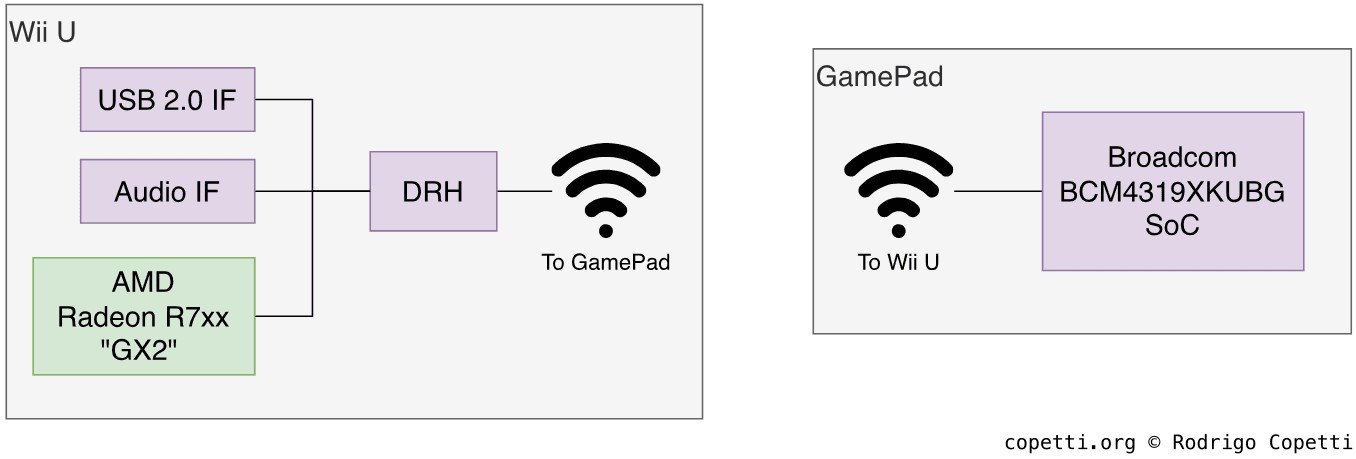
Overview of the GamePad-Wii U connection.
DRH runs a Real-time Operating System (RTOS) which implements the µITRON 4.0 specification. It's quite sophisticated, offering cooperative multitasking and inter-task communication. Finally, it's worth noting that the Wii U-GamePad communication over Wi-Fi is not mixed with the internet capabilities of the Wii U, that's handled by a separate chip (and antenna).
Background functionality
Apart from the personalised implementation of the network stack (which will be explained in a bit), the GamePad does a lot of processing behind the scenes.
Once the GamePad is up and running, the device is capable of displaying an H.264 video stream by decoding it on-the-fly. The screen resolution is 854x480 pixels with a refresh rate of 60 Hz, which isn't exactly HD, but it maintains 16:9 proportionality.
Strange use of standards
Similarly to how the Wii Remote mangles the Bluetooth protocol to avoid third-party usage, the GamePad breaks two Wi-Fi standards, namely WPS and WPA2-PSK, so they only work with the Wii U .
In summary, the Wii U and the GamePad communicate with each other using 802.11n in the 5 GHz band. The console acts as an access point (AP) and the GamePad acts as its single client. Be as it may, Memahaxx also reported that the console's operating system implemented the possibility of using two GamePads at once, albeit left unused.

The process of pairing a GamePad with the Wii U involves the user entering a password made of Poker card symbols.
To establish a communication channel for the first time, both devices must be 'paired' first (in the same way a Windows laptop pairs with the Wi-Fi router by selecting the network name and supplying a password). This is done using the Wi-Fi Protected Setup (WPS) protocol, however, it's not as easy as pressing the SYNC button and waiting until both devices pair. The process also involves the user selecting specific poker symbols shown on the GamePad as instructed on the TV (rendered by the console). Behind the scenes, the user is inputting part of the password, the GamePad then adds a hardcoded 5678 at the end of the password and sends it to the console. If the process has finished successfully, the GamePad receives the console's SSID, BSSID and PSK values so it can automatically connect from now on.
From there on, subsequent connections rely on the WPA2-PSK protocol and both devices transfer their information using TCP/IP packets.
As a curious fact, the GamePad takes advantage of timestamps to keep Audio and Video streams synchronised. Timestamps are an attribute found on 'Beacon Frames', broadcast by access points for many reasons, one of which is to synchronise the internal clocks of in-range devices.