When it comes to I/O and interaction methods, Nintendo still manages to break the status quo. From the hardware perspective, the choices and internal organisation of these components tend to reach cost-effectiveness at obsessive levels. It may be because this area is under the complete direction of Nintendo's engineers, and they strive for keeping the console at an affordable price.
A familiar ARM chip
Remember the old ARM926EJ-S that had complete control over the Wii's hardware? Well, the same CPU is found in the Wii U. The main difference, however, is that Starlet is now surrounded by larger amounts of memory (96 KB of SRAM) and implements better algorithms for security-related tasks.
By the way, in the absence of an official name for the ARM9 CPU in the Wii U (after all, in the eyes of Nintendo, you shouldn't know about this chip...), fail0verflow came up with their identifier: Starbuck.
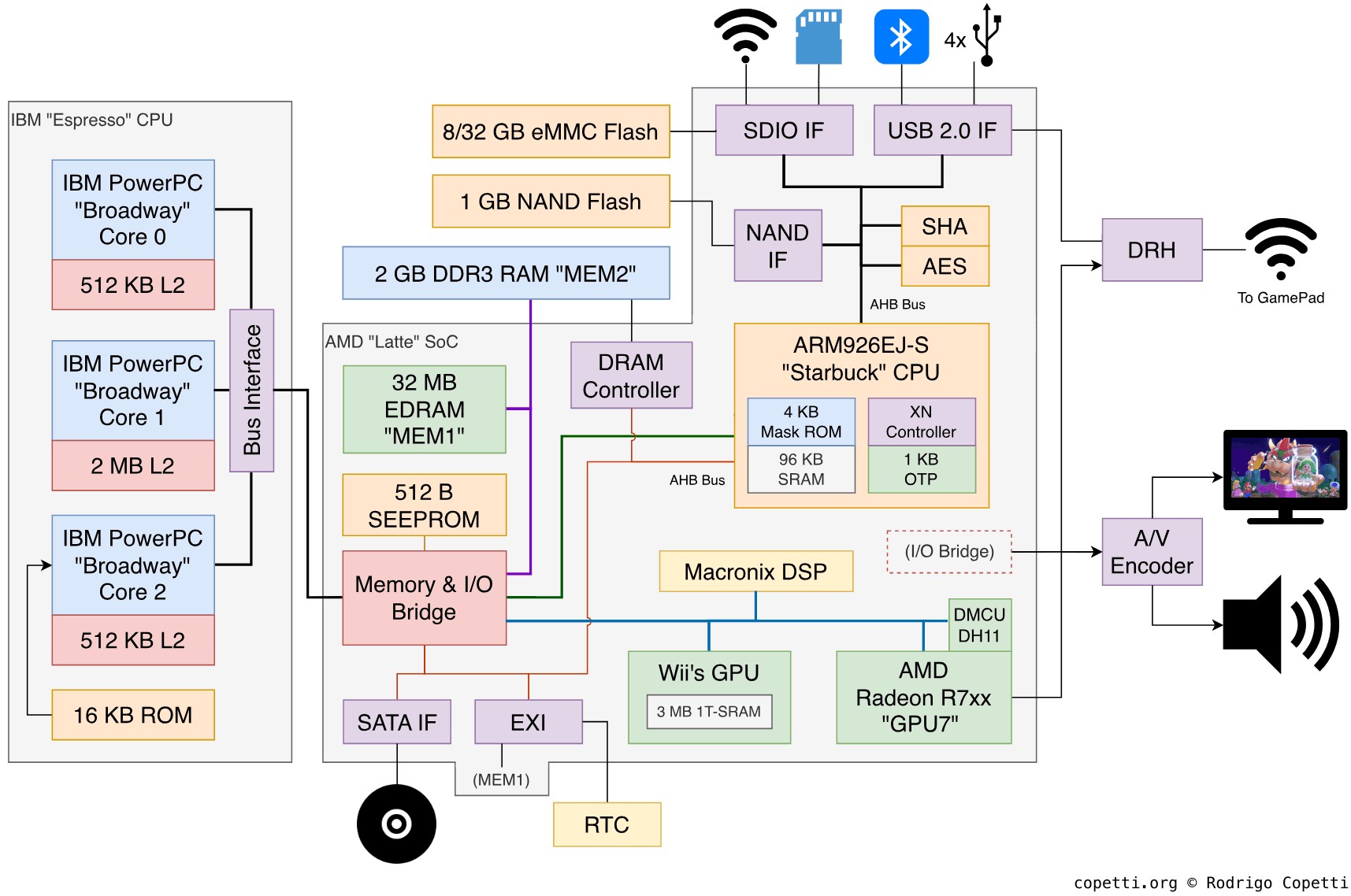
Main diagram of the console's architecture. Notice how Starbuck is located in a strategic area within Latte.
That being said, Starbuck's program has been greatly enhanced. I go over it in the 'Operating System' and 'Anti-Piracy and Homebrew' sections. For now, just remember Starbuck is the equivalent of the Southbridge.
External interfaces

Front view of the console with the faceplate door opened.
Looking at this console from the outside, the Wii U offers the following interfaces:
- Four USB 2.0 ports to connect accessories or mass storage devices. Two of them are at the back and the others at the front.
- An SDHC card slot for storage.
- A proprietary Sensor bar port to plug the Sensor bar, enabling up to four Wii Remotes to control the Wii U (in addition to the GamePad). Remember the sensor bar is just four 'dumb' LEDs beaming infrared light, the real magic happens inside the Wii Remote!
Internal interfaces
As mentioned before, Starbuck is connected to the majority (if not all) of the I/O peripherals. Considering its strong backwards compatibility with the Wii and the inclusion of the same ARM9 core for I/O processing, I assume Starbuck still relies on AMBA buses to communicate with its peripherals, specifically the AHB type (since the new interfaces require higher amounts of bandwidth).
Having said that, Starbuck is connected to the following endpoints:
- The NAND Interface pointing to 1 GB of NAND storage. In practice, only half is used by the Wii U system and the other is reserved for backwards compatibility (the old Wii storage).
- Three SD Host Controllers, each providing access to:
- The separate Broadcom BCM43362 chip, for Wi-Fi connectivity (2.4 GHz 802.11 b/g/n).
- The SDHC card slot.
- Either 8 GB or 32 GB worth of eMMC storage for storing user data.
- Three USB 2.0 Host Controllers, each giving access to:
- The separate Bluetooth 4.0 module that wirelessly interacts with the Wii Remotes and the 'Pro' controller (all of them are optional).
- The aforementioned four USB ports.
- Another separate chip called DRH-WUP exchanges data with the GamePad using a 5 GHz Wi-Fi signal.
- An Advanced Host Controller Interface (AHCI), revision 1.2, to connect to the Disc Drive using the SATA protocol.
- A legacy External Interface (EXI) to access the Real-Time Clock (RTC). According to fail0overflow, the EXI block is also attached to some MEM1 for backwards compatibility reasons , allowing to emulate part of the legacy IPL ROM using portions of MEM1.
The supplemental interface
For another status-quo-breaking moment, let's now go over some unusual features that the Wii U included, which at first no one knew what they would be used for.

An amiibo figurine of Mario related to the new Super Smash Bros title .
When the Wii U reached the hand of users, they quickly noticed the GamePad had a Near-Field Communication (NFC) reader. Initially, Nintendo didn't share the goals of such capabilities and some outlets even speculated that it would eventually enable NFC payments . It wasn't until 2014 that Nintendo finally unveiled their intentions with NFC technology: Figurines, which they called amiibos. These embed a unique NFC tag and games that support them allow the user to 'scan' their amiibo (by placing them on top of the reader area of the GamePad). Then, the game will detect which type of figurine is placed and react accordingly (i.e. unlock premium content, create a special avatar and so forth). Tags may also bundle small storage (just 512 Bytes ) that games may use to store user data.
Overall, not only these figurines opened up another market for Nintendo but they also quickly turned into a rare collectible (for the enjoyment of scalpers). Though the market of these figurines wasn't exactly 'new' as other companies like Activision and Disney were already commercialising this type of product.