One may assume that game development would just inherit the same tools as the Game Boy (namely, plain assembly), but it turns out Nintendo and NEC invested in new technologies to modernise and accelerate third-party development.
Development ecosystem
Game studios had the option to purchase a development kit from Nintendo, which included a fully equipped debugging station, toolchain, and plenty of documentation.
The hardware kit was called VUE Development System ('VUE' was the codename of this console). It was a PC-like tower that housed the Virtual Boy's internals, plus 4 MB of RAM (expandable to 8 MB!). It connected to a headset resembling the retail Virtual Boy, and a retail controller. To run and debug software, the development kit featured an interface board that communicated with an IBM PC via SCSI. To operate the equipment, developers required an IBM PC/AT (or compatible clone) with an Intel 80386 CPU, 2 MB of memory and MS-DOS installed.
The software kit included a linker, assembler, and debugger. Upon request, Nintendo also offered a C compiler, meaning developers no longer needed to write programs directly in assembly! Altogether, this setup took 1.5 MB of your precious -and noisy- hard disk.
It's unfortunate that this model of development was later reverted with the release of the Game Boy Color. I presume this was due to the Game Boy Color's CPU being unable to handle 'unoptimised' code from a compiler.
Medium
Game cartridges are referred to as Game Paks, the same name used for the Game Boy medium, though they differ entirely in shape and functionality.
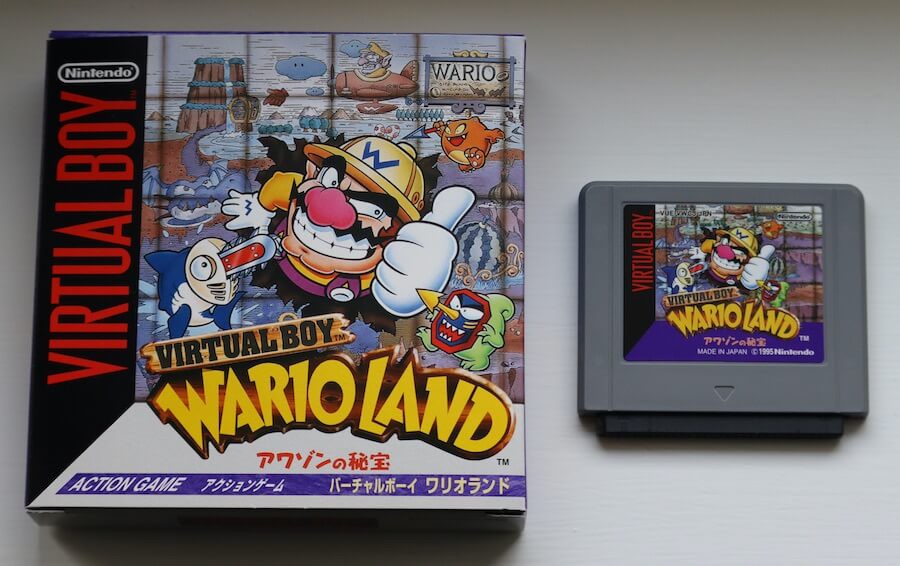
Example of a retail game.
Due to the available memory address space, the ROM can reach up to 16 MB without a mapper. The same applies to external RAM. As with the Game Boy, cartridges may include battery-backed SRAM. Access to the cartridge is handled via a 16-bit data bus.
Come to think of it, 16 MB of ROM is quite substantial for the mid-'90s. After all, the maximum size of a Game Boy ROM was just 128 KB (without a mapper)! Then again, let's not forget this console uses 32-bit addressing, so each address occupies 4 bytes. That's twice the size of Game Boy's 2-byte addresses, which adds up to the space requirements.
Rules
Due to safety concerns, Nintendo ordered developers to include a set of frames aimed at mitigating eyestrain and other conditions associated with prolonged screen use.
Thus, all games displayed a 'read the instructions' warning, an alignment guide, and an automatic pause dialogue.

The 'read the instructions' screen.

The screen alignment guide.
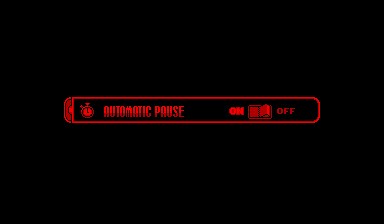
The automatic pause dialogue.
These screens appear after the console is switched on:
- The first 'orders' the user to read the instructions manual before continuing.
- The second is some sort of 'test card', used to properly adjust the IPD dial and focus slider.
- The third prompts the user to choose whether they'd like to receive a reminder to take a break every thirty minutes.
The first and third screens were often customised to match the game's theme.
I don't think Nintendo imposed similar guidelines again until the release of the Wii.