Over the years, the program in charge of controlling a given console before a game starts has become more and more convoluted - mainly due to the increasing need for security and services (updatable APIs, online multiplayer, multimedia, etc.). The PSP tries to accommodate all of this within very constrained hardware. Now, I don't mean to say that the outcome is mediocre, but many decisions are the result of balancing costs, performance, and robustness.
Architecture and design
First and foremost, the PSP contains a hidden, undocumented 4 KB ROM inside Tachyon. This is where the bootloader resides . In other words, upon powering on, the CPU will start by looking for instructions in there. That ROM has many names, including 'Bootrom', 'Pre-IPL' and 'Lib-PSP iplloader'.
The rest of the system is installed on 32 MB of NAND Flash memory found in the motherboard. Here is where the majority of the PSP's Operating System (OS) resides.
The OS is composed of the following components:
Modules
A module is what we would call a 'program' or 'driver' in the PC/Windows world. Once loaded, modules may reside in memory and perform the following tasks :
- Expose functions to simplify access to certain hardware.
- Run as a foreground program (e.g. games).
A module binary may be encrypted or decrypted. It also embeds metadata to define whether it's a 'user module' or 'kernel module'; the latter allows the new module to control privileged areas in memory (where the kernel resides).
Modules are summoned by the 'kernel' or 'Visual Shell' (VSH). User modules can execute other modules at the discretion of the kernel. This enforces security - the kernel will never load kernel modules from Universal Media Disks (UMDs), for instance.
Kernel/IPL
While this OS doesn't contain a kernel per se, it has multiple components that fill in the duties of a traditional kernel.
The first component is the IPL, which is loaded by Pre-IPL and takes care of initialising the hardware. Part of the IPL, called IDStorage, also stores unique information about the console (such as its MAC address, serial number, and UMD authentication keys) . Overwriting this last area causes catastrophic results! So the UMD keys are duplicated a couple of times to survive corruption.
The IPL then loads a set of kernel modules which handle low-level operations (memory management, multi-threading, and file system). They also implement memory access exceptions triggered by the MPU (remember the segmentation paragraph?). For the sake of simplicity, whenever I use the word 'kernel' in this article, I will be referring to these kernel modules.
Having said that, the kernel doesn't do multitasking, but it does implement cooperative multi-threading for single processes.
The kernel persists in memory as long as the console has power. For that reason, programs (user modules) aren't written for bare-metal. Instead, user modules rely on functions exposed by kernel modules. Consequently, the kernel reserves 4 MB of main RAM and another 4 MB for 'volatile memory' (temporary buffer for many operations, with access granted at request). That only leaves 24 MB of main RAM (out of 32 MB) for user programs.
Other Parts
NAND also houses other sections of the firmware.
Firstly, there's the Visual Shell or 'VSH', which is the first thing the user notices after powering on the PSP. The VSH is a graphical user interface that allows the user to run games and other modules (only user-type ones). It is composed of multiple modules, some of which are only loaded upon request.
As a curious fact, the system call used to launch retail games works by first rebooting the console, and then loading the executable. This approach was possibly done to unload the VSH and free up resources for the game.
Secondly, there is a second partition in NAND that stores user-related data, such as network settings. This partition is called 'flash1' (as opposed to 'flash0') and its contents are called system settings.
Boot process
Now that we have identified the main parts, let's examine how they work together to bring the console into a 'working state' (once it is switched on). Security is discussed only briefly here; the later 'Anti-Piracy and Homebrew' section explores it in more depth.
The complex boot process works as follows :
- The main CPU's reset vector is at
0x1FC00000, which points to the Pre-IPL ROM inside Tachyon.- The first half of Pre-IPL tells the CPU to copy its second half to scratchpad memory and continue execution from there.
- Pre-IPL looks for the next stage from either NAND or an external memory stick. When the latter is selected (never under normal use), the PSP enters a mode called factory service mode. For simplicity, we'll focus on the normal mode (selecting NAND).
- Pre-IPL initialises the NAND controller and continues execution from NAND. The second part of Pre-IPL runs the IPL, which is encrypted, so it is decrypted (using 'KIRK', more details later) and copied to eDRAM (within the Graphics Engine) as a working area.
- Once finished decrypting, it continues execution at eDRAM, where the decrypted IPL resides.
- The first half of Pre-IPL tells the CPU to copy its second half to scratchpad memory and continue execution from there.
- The IPL's execution process is divided into three stages.
- The first stage, called the loader, resets the main CPU and hides the Pre-IPL ROM from the memory map. The loader also initialises minimal hardware and decompresses 'Main.bin', the next stage, on eDRAM.
- Main.bin focuses on initialising the rest of the hardware, including main memory. Once it finishes, it decrypts the third stage onto main memory and continues execution from there.
- The final stage, referred to as payload, loads the kernel. The kernel is stored in the form of multiple binaries, modules and metadata that, once loaded into main RAM, gives life to the system. Afterwards, the interactive shell is shown.
Visual Shell
Internationally speaking, this console debuts the famous XrossMediaBar or 'XMB' interface. This is the feature-rich Graphical User Interface (GUI) that shipped with the PSP.

The main screen (when no game is inserted or installed).
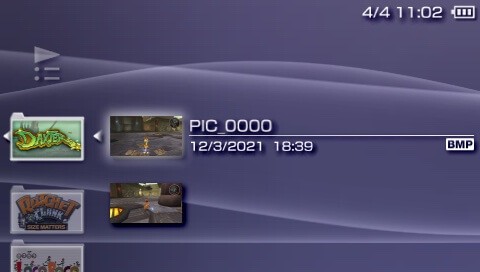
XMB includes a photo and video viewer.
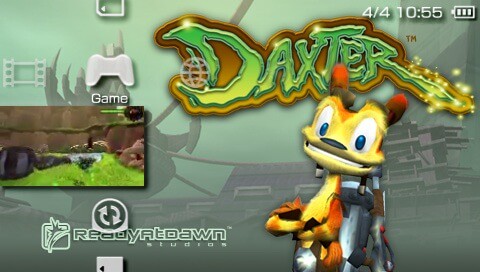
The 'Game' category allows to run a game, manage saves or search for other PSPs (Game Sharing).
When the user steps on the actual game item, the XMB styles itself with assets provided by the game, until the user selects another element from the category.
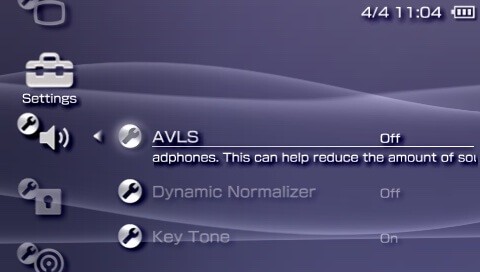
The 'Settings' category provides lots of customisation options.
Some entries group multiple configuration controls.
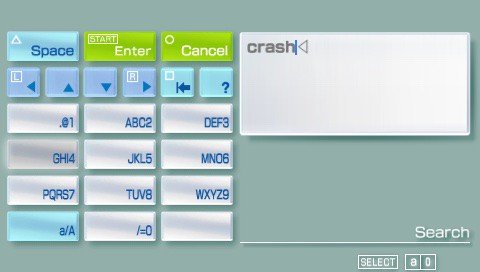
This is how you type in this console, old-school cellphone style.
From a human-computer interaction standpoint, the XMB's design reveals very interesting solutions to interaction challenges (such as navigating around many depths of information, avoiding flooding the user with options, and fitting all these entries in a 4.3" screen). In essence, information is organised into 'categories' and 'elements', and the D-pad is used to navigate between them. The left and right arrows switch between categories, while the up and down arrows select an element within the current category. It's worth pointing out that all categories are found at the same hierarchy level. So, no entry is shown superimposed over the rest. This impedes the insertion of attention-stealing advertisement and whatnot.
On another topic, the XMB provides customisation options, such as changing the background colour and re-arranging items. Moreover, it provides access to multimedia services and, of course, allows the user to load up the game (whether from a UMD or memory stick).
There's also an embedded file viewer, which is used for both multimedia and save management.
Updatability
As we've seen before, everything except Pre-IPL is stored in writable storage, and is therefore 'updatable'. Sony distributed firmware updates in the form of downloadable files, which users could either download manually or via the 'System Update' assistant. The latter also installed those packages.
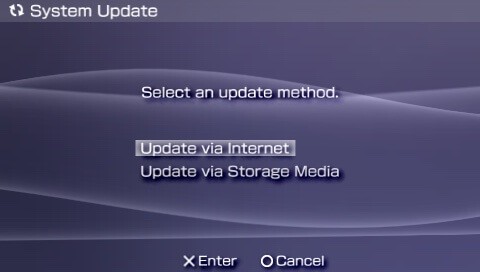
The System Update 'Wizard'.
Some updates strengthened the PSP's security system by adding layers of encryption to the boot process and integrity checks for kernel modules.
From the developer's standpoint, some updates enhanced the APIs by adding more functions and correcting existing ones. Consequently, games were tied to the system version they were developed for, and users were required to update the firmware to play newer games. However, new updates were always backwards compatible, so older games should never break on an updated system (at least, in theory).
From the user's perspective, some updates introduced new services, like a web browser, an RSS reader, and so forth. After the release of the PlayStation 3, many online applications were ported to the PSP, including the 'PlayStation Store' and 'Remote Play'.