When the PlayStation 2 debuted in Japan in 2000, its initial I/O offerings left significant room for improvement. I mean this in the literal sense, as the accessories Sony shipped left plenty of empty space inside the console's casing. It was only after the international revisions reached American and European shelves, that users realised how this gap would be filled.
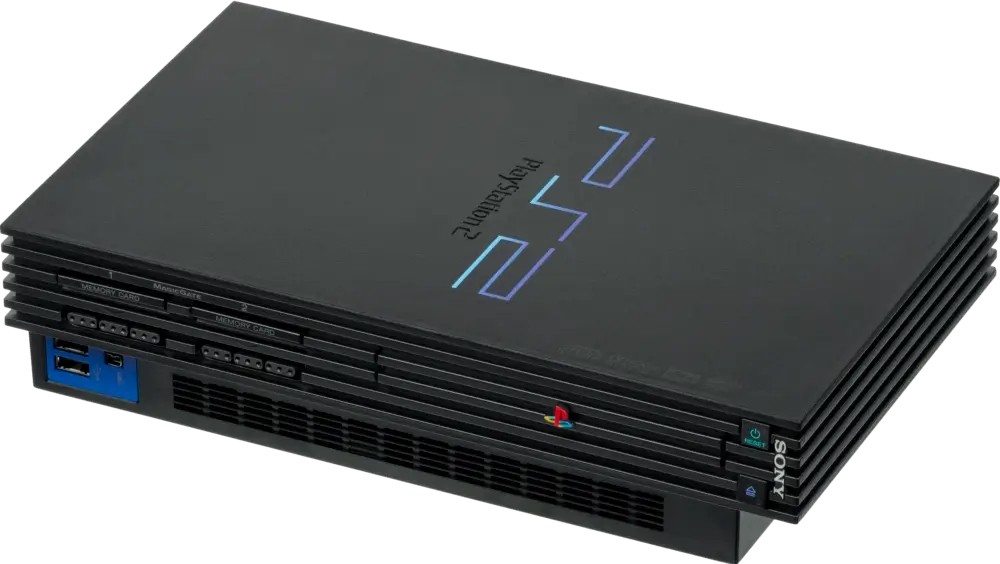
The original 'fat' design (2000) .
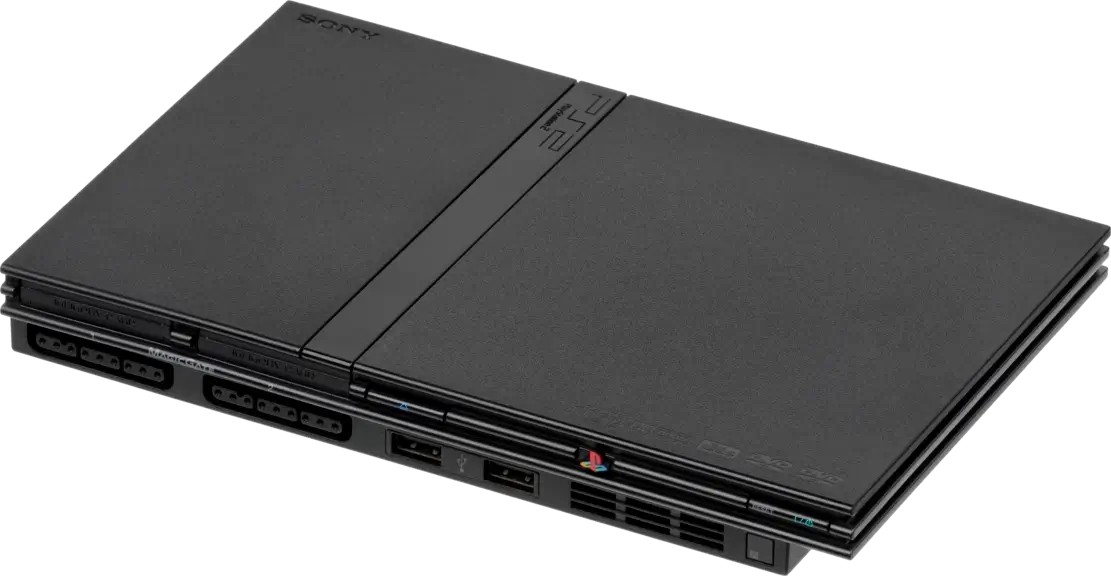
The later 'slim' redesign (2004) , featuring roughly half its original volume.
Admittedly, the PS2's lifespan overlapped with a surge of media-centred interfaces like USB, Ethernet, FireWire, Infrared... some of which were short-lived, whilst others became popular standards.
Sony, as a company, also held a stake in several protocols. Thus, between 2000 and 2013, Sony continuously revisited the console's design in a way that radically disrupted both its internal and external I/O.
With that in mind, let's look at what this console offered, from start to finish.
The special CPU
No matter the revision, the PlayStation 2 houses a dedicated processor that arbitrates communication between different components. This separate CPU is called I/O Processor (IOP) and runs at 37.5 MHz, connected to a 32-bit bus .
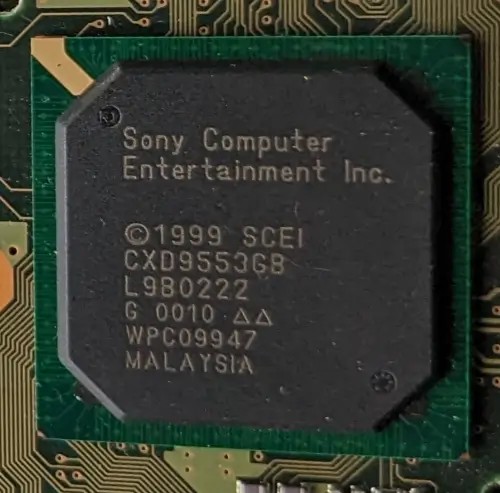
The IOP chip on my early motherboard revision, hiding a MIPS R3000A.
The IOP communicates with the Emotion Engine using a specialised I/O interface called System Interface or 'SIF'; both endpoints use their DMA units to transfer data between them. All in all, this processor gives access to the front ports, DVD controller, SPU2, the BIOS ROM, and the 'PC card' slot.
Initially, the IOP materialised in the form of the original MIPS R3000-based core found in the PlayStation 1, paired with 2 MB of EDO RAM used as a buffer.
The special upgrade
The SCPH-750XX revision (2005), released a year after the 'Slim' redesign, swapped the MIPS core for a highly unusual SoC that instead houses :
- A PowerPC 440x5 CPU. This chip is part of the streamlined PowerPC 4xx series spearheaded by IBM and tailored for microcontroller applications.
- An Auxiliary Processing Unit (APU), a package composed of partial MIPS R3000A circuitry (the decoder and ALU), the good-old Geometry Transformation Engine, and extra registers for interprocess communication.
- An Ethernet transceiver, previously distributed as an external accessory.
Sony also fitted 4 MB of SDRAM alongside the SoC (an increase of 2 MB, and synchronous this time).
The new package is referred to as PPC-IOP and runs at a lightning 440 MHz instead. Interestingly, the PPC CPU is still tasked with running MIPS code . This is achieved with the help of a MIPS emulator called DECKARD (stored in the BIOS ROM ), which makes use of the additional SDRAM and the APU to accelerate the process.
Given that the inner workings and operating speed of PPC-IOP differ considerably from those of the original IOP, there's an additional database of patches with entries for each affected game . Furthermore, DECKARD tries to approximate timings using an event handler. However, performance degrades when executing certain instructions . Additionally, almost 24% of SDRAM is left unused for unclear reasons .
In light of this, I wonder why Sony redesigned the I/O ecosystem in a way that not only degrades performance but also wastes all its perks. Perhaps this was done solely to reduce manufacturing costs while keeping backwards compatibility (I elaborate more in the following paragraphs). It's worth mentioning that, at the time, Sony had recently struck a deal with IBM to build the Cell processor as well.
Inherited compatibility
For those PS2 models incorporating the predecessor's CPU, one can suspect that PS1 compatibility would be part of the package. Conveniently enough, Sony did bundle a PS1 emulator (called PS1DRV) which loads whenever a PS1 disc is inserted. During this process, the IOP is underclocked to operate at PS1 speeds, the EE is 'repurposed' to emulate the original GPU, and the SPU2 is remapped to behave like the original SPU.
In PowerPC-based models, PS1DRV runs on top of DECKARD.
External interfaces
At first glance, the console inherited the previous front ports from the original PlayStation, now accompanied by a couple of 'modern' interfaces that evolved throughout the years.

Front of the PS2, revision SCPH-3000x (2000), showing known sockets for controllers and Memory Cards. Plus, the new USB and i.Link ports .
The most popular additions were the two USB 1.1 ports. Their theoretical speed is 12 Mbps, but that's highly dependent on the IOP's bandwidth (which tends to be considerably slower). Nevertheless, they remained unchanged across revisions, making them a favoured choice for third-party accessories.
In addition to that, the revision SCPH-500XX (2003) introduced a discreet infrared sensor , intended for use with a Sony-branded remote controller (sold separately).
Other interfaces proved short-lived. For instance, until model SCPH-500XX (2003), the console also featured an i.Link port (also known as IEEE 1394, or 'FireWire' in Apple's world). This socket was made for connecting two PS2s for local multiplayer; I presume its utility likely diminished after the 'Network adaptor' (explained next) gained popularity.
The unusual combo
On the rear of the console, we also find a slot for PC cards, demonstrating that this console was designed with expandability in mind. To make use of this, you could purchase Sony's Network Adaptor card, which offered three new interfaces:
- An Ethernet port and a 56k modem port for online multiplayer.
- A proprietary port for an external Hard Disk Drive (HDD) Unit: Also sold by Sony, it packaged a typical 3.5" ATA hard drive with 40 GB of space. The disk enabled games to store temporary data or permanently install themselves there for faster load times. Just a few games leveraged this feature, though, with better adoption in Japan than in the rest of the world.
In later revisions (SCPH-3000X, released the same year), the PCMCIA port was replaced by an Expansion Bay, into which the 3.5" HDD could now be fitted inside the console. Users first had to buy the revised Network Adaptor, which now included an ATA-66 connector on the opposite side.

Back of the PS2 showing the Expansion Bay (with the cover removed) .
Inside the HDD, data is structured using a file system called 'PFS' . Strangely, the layout doesn't contain a partition table, but rather a primitive catalogue called 'Aligned Partition Allocation' (APA). This may be because Sony only shipped 40 GB drives. Hence, scalability wasn't on their list of priorities.

Network Adaptor as seen from the front . This particular model provided modem and Ethernet ports.

Network Adaptor as seen from the back , with a hard drive fitted.
The Ethernet transceiver bundled with the adaptor supports transfer rates of up to 100 Mbps (12.5 MB/s). However, the observed rate is notoriously lower (as low as 2 MB/s in some cases). The explanation is relatively simple: to achieve usable network communication, one is required to implement all the layers of the standard 'OSI Model' - and the transceiver is just one piece of the puzzle. The rest is often delegated to the IOP (and therefore handled in software), but due to the IOP's limited performance , this results in a bottleneck.
Slimming down
The major 'Slim' revision (2004) not only significantly reduced the console's size, but also reorganised the entire Ethernet + HDD model: the Expansion Bay was removed, and an Ethernet port was permanently fitted to the rear. Early Slim revisions also bundled a modem.

The back of my slim model, showing a fixed Ethernet port.
Curiously enough, until 2005, Slim motherboards incorporated the same Ethernet and HDD controller found in the Network Adaptor. It wasn't until the IOP transitioned to PowerPC that these functions were absorbed into the IOP.
Interactive accessories
Sony's new controller, the DualShock 2, is a slightly improved version of the PS1's DualShock. Furthermore, as the standard controller, it unifies all previous DualShock designs into a single variant.

The DualShock 2 controller .

An official Memory Card (8 MB model) .
You see, during the days of the original PlayStation, multiple revisions of the original controller were released, each offering distinct features, which also brought fragmentation in the market. Now, for the benefit of developers, there is a single controller that consolidates all previous functionality.
Compared to the original DualShock, the new version retains the two analogue sticks and two vibration motors for richer input and feedback, respectively, whilst introducing pressure-sensitive buttons for a different kind of input.
Next to the controller slot is the Memory Card slot, now compatible with PS1 and PS2 protocols. The latter cards embed extra circuitry for security purposes referred to as MagicGate; this is a combination of encryption and authentication that enables games and the OS to restrict data transfers between different memory cards. The IOP takes care of encrypting and decrypting the content, and it does so with the help of the MagicGate chipset (found inside the Memory Card) and the DVD subsystem, which contains the encryption keys.
Some third-party Memory Cards didn't support MagicGate, however.
The new disc reader
As you may already know, Sony fitted a new type of optical disc drive designed to read two types of discs: CD-ROM XA (for PS1, some PS2 games, and audio CDs) and the new format known as Digital Video Disc or 'DVD' (for movies and PS2 games). I discuss further details regarding the DVD medium in the 'Games' section.
For now, it's worth knowing that inside the drive there is a complex subsystem. Building upon the original PlayStation model, the new disc controller is a much more sophisticated piece called Mechanics Controller or 'MechaCon' . This circuitry features its own dedicated mask ROM, RAM, EEPROM, and Real-Time Clock (RTC). Aside from managing the drive, it also enforces disc anti-piracy and MagicGate authentication and encryption.
Initially, there was also a separate System Controller or 'SysCon' chip that handled power and thermal control throughout the system , but with the SCPH-390XX revision (2002), SysCon was absorbed into MechaCon.
As a curious note, the PS2 drive exhibits a longstanding design fault, in which its Digital Signal Processor (DSP) - in charge of processing the signal read - may freeze when the disc is excessively scratched, thereby damaging the laser component . This occurs because the DSP may receive corrupted Error Correction Data (ECC) from the disc and stop functioning, potentially leaving the actuator energised for longer than allowed, causing it to overheat.
Finally, the drive provided maximum read speeds of 48x for CDs (3.69 MB/s) and 4x for DVDs (5.54 MB/s) .