Having a large number of CPUs eventually impacts the overall complexity of the operating system. Not only that, but this console also stores more than one OS. This originates as a mechanism for providing large services (i.e. DSi/DS/GBA backwards compatible, rescue mode, etc.).
So, to avoid making this section any more confusing, let's go by steps.
Architecture
The Nintendo 3DS, as a whole, comes with four firmware :
- NATIVE_FIRM: Operates the console in 'native' mode (with the functionality exclusive to the Nintendo 3DS). Here, the ARM11 executes the main program.
- Curiously enough, there are two instances of NATIVE_FIRM installed (named FIRM0 and FIRM1, respectively) in case the first one gets corrupted, for some reason.
- This firmware is often referred to as 'Horizon' as well.
- TWL_FIRM: It commands the Nintendo 3DS to behave like a Nintendo DSi. It does come at the expense of disabling all the exclusive features, but considering how the CPU, GPU, sound and I/O are intertwined; TWL_FIRM is truly a work of art. Consequently, the ARM9 and ARM7 are placed in the foreground (they execute the main program) .
- The name 'TWL' comes from the codename of the Nintendo DSi.
- AGB_FIRM: Similar to TWL_FIRM, the 3DS now becomes a Game Boy Advance. Here, the ARM7 executes the main program.
- SAFE_FIRM: Used solely for maintenance-related tasks, such as system updates. This firmware is basically an early revision of NATIVE_FIRM (doesn't go beyond version
3.0on the old 3DS and version8.1on the New 3DS ).
All of these firmware come with separate binaries for the ARM11, ARM9 and ARM7 CPUs. The only exception is that the ARM7 won't be active under NATIVE_FIRM and SAFE_FIRM.
Generally speaking, the Nintendo 3DS will first launch a Boot ROM and then bootstrap NATIVE_FIRM. Afterwards, the running operating system may choose to reboot to another firmware based on the user's actions (i.e. load a Nintendo DS game or run the firmware update assistant).
Let's take a look now at how each CPU behaves in NATIVE_FIRM mode.
The security processor
Once NATIVE_FIRM is bootstrapped, the ARM9 runs its own operating system made of a kernel called Kernel9 and a single program called Process9 .
Kernel9's design follows the microkernel model, meaning it only provides essential abstraction with the hardware, including:
- Memory management.
- Process scheduling.
- Inter-Process Communication.
On the other side, Process9 is a userland application that implements these services:
- Communication with the ARM11, called 'PXI'.
- Cryptography-related functions. This involves AES, RSA, SHA and ECDSA.
- I/O management.
- File System.
- Title (3DS software) verification and installation.
Both Kernel and Process9 reside on an ARM9-only block of 1 MB of SRAM (1.5 MB in the case of the New 3DS).
In terms of security, there's no privilege distinction between Kernel9 and Process9, since the latter has unconditional access to a system call that runs arbitrary code in kernel mode.
In summary, combined with the exclusive I/O hardwired into the ARM9, this CPU has the role of a security processor, much like what the Wii and Wii U's ARM9 also did, and unlike the co-processor architecture of the Nintendo DS, where its second processor just offloaded I/O and audio tasks.
The user processor
Likewise, the ARM11 runs a kernel of similar architecture to the ARM9 one (now called Kernel11). The big difference is that the ARM11 will be running multiple userland processes, and in doing so they provide services like:
- Communication with the ARM9, called 'PXI'.
- Multi-core processing.
- Networking, HTTP and SSL.
- Connection with Nintendo online infrastructure.
- The graphical shell (called 'HOME Menu').
- The ability to launch applications.
- A layer of abstraction for apps called Services, which games must call to access hardware resources. Some components like the GPU are interfaced by a very thin API, nonetheless.
- Furthermore, services are implemented in a layered manner. Games only access a subset of these, and the latter in turn invokes greater privileged and specialised services.
The ARM11's kernel resides on a dedicated block 512 KB of SRAM , also called 'AXI Work RAM' or 'AXI WRAM', because it's connected to the ARM11 using the AXI protocol.
Imposed behaviour
Now for the bitter news, NATIVE_FIRM also enforces unusual restrictions on user programs.
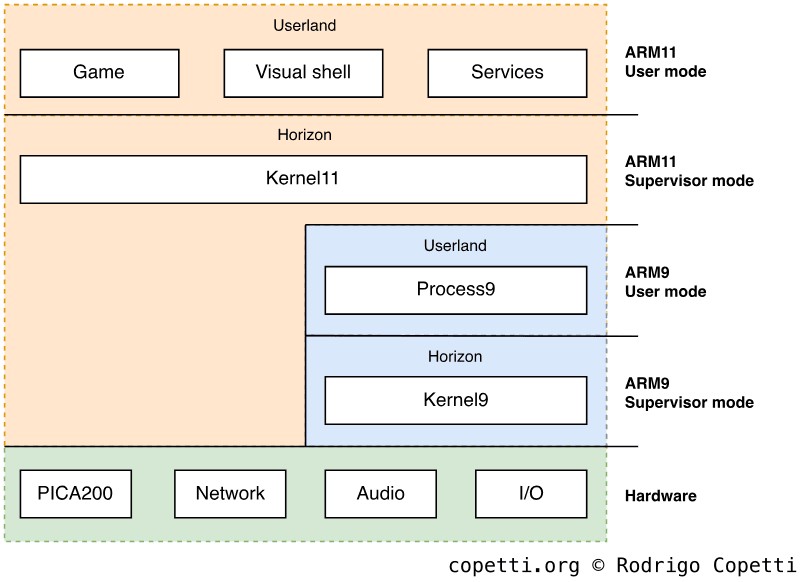
Overview of the privilege levels in the Nintendo 3DS running NATIVE_FIRM, after combining both operating systems.
To start with, the ARM11's scheduler is hard-coded with specific behaviour for each core (as opposed to treating every core as general-purpose units):
- The first core, called appcore, is for the game to use. Yet, its thread scheduling policy is FIFO, meaning that the game can deadlock itself if multi-threading is improperly used .
- The second core, called syscore, gets assigned system-related tasks.
Conversely, syscore can lend 30% of its execution time to user applications, which may be helpful to offload some operations, although not every routine may work under syscore (especially time-sensitive ones) .
The curtailment is further extended with the New 3DS, whose ARM11 MPCore now comes with four cores, namely:
- The fourth MP11 core is solely used for face-tracking. Instead of adding circuitry, Nintendo engineers implemented face-tracking through pure software. Thus, it reserves one MP11 for this. I'm guessing this was a cost-effective solution for Nintendo.
- The third MP11 core is predominantly idle . This is because, by default, the scheduler is not programmed to dispatch threads there. Game meta-data does include a flag that enables thread scheduling on the third core, albeit its adoption has only been confirmed in Xenoblade Chronicles 3D (a game exclusive for the New 3DS, incidentally), so far. It's possible that, at one point, Nintendo considered a more seamless approach, but ultimately found it unfeasible due to battery consumption concerns, and perhaps compatibility issues with games optimised for either setup.
- Considering the New Nintendo 2DS XL is a 'New'-type variant without the stereoscopic screen, this means that, for the most part, half of its quad-core CPU is wasted!
- CDMA, the 'New' DMA unit, is only accessible during the console's boot . After the boot process finishes, CDMA is never used again.
Moving on, in terms of usable RAM for games, we know that the Nintendo 3DS and New Nintendo 3DS come with 128 MB and 256 MB of FCRAM, respectively. What you need to know now is that the available RAM for apps is only 64 MB and 124 MB , respectively. This means that the OS consumes ~50% of the console's main memory, not a particularly pleasant quality! To alleviate this, games also have the option to set a flag in their metadata (called APPMEMTYPE) to claim more FCRAM from the system, up to 96 MB and 176 MB, respectively. Behind the scenes, that flag instructs the system to reboot the console and boot the game without launching the HOME Menu beforehand, saving memory along the way.
All things considered, you can now sense how not all extra hardware in the New 3DS will automatically imply faster software. It's a shame, and it gives me the feeling that the New 3DS was a rushed product, from the software perspective. But to be fair, Nintendo never planned the 'New' 3DS to be a full successor of the original 3DS. The 'New' brand was a clear move to refresh the 3DS line, considering the sales number wasn't satisfying, to say the least.
Storage Medium
Now that we know how the operating system is designed, let's look at where and how data is stored in this console.
Boot ROMs
Following its long ancestor, the Game Boy, the SoC stores a series of unencrypted ROMs containing the programs used for booting up NATIVE_FIRM . These bootstrappers are called Boot9 and Boot11; and are executed by the ARM9 and ARM11, respectively. Likewise, they are physically and virtually kept hidden for security reasons. To give you an example, Boot9 stores AES decryption keys, which are not something to carelessly leave anywhere.
Interestingly enough, Boot9's code has revealed that it's more capable than just bootstrapping NATIVE_FIRM from eMMC NAND. However, due to certain routines having hardcoded directories and security layers added on top, the only firmware the Boot ROMs can ultimately load is NATIVE_FIRM from eMMC NAND.
Moreover, while multiple components have changed with the arrival of the New 3DS, the BootROMs have not changed a bit .
OTP memory
To further increase the level of security, the console stores a series of console-unique information in One-Time-Programmable (OTP) memory . Similarly to the Wii and Wii U, this information also includes encryption keys.
OTP is written once during manufacturing, so the keys differ between each console. Hence, one hacked console won't necessarily be able to compromise the rest. This is a significant milestone for a portable console, considering a certain previous implementation included global keys.
eMMC NAND
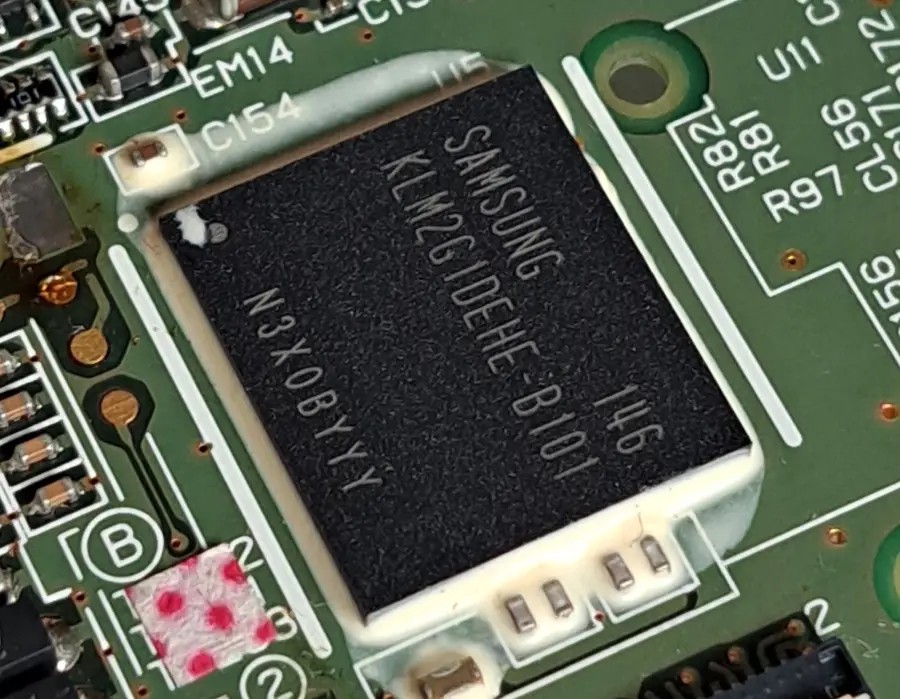
Samsung-made eMMC chip on the original 3DS.
Next to the big SoC, there's an eMMC NAND Flash chip. However, its size is slightly different depending on the manufacturer . For instance, Toshiba supplied 943 MB and 1,888 MB chips, while Samsung provided ones with 954 MB and 1,240 MB.
To tackle this disparity, Nintendo defined the 3DS partition table using a common size: 943 MB for Old 3DS (Toshiba-size) and 1,240 MB (Samsung-size) for New 3DS. So, if your console came with a larger eMMC chip, the extra space is unfortunately left unemployed.
In any case, the console relies on eMMC for storing its system data, including the multiple firmware, and user data (saves and configs within 3DS and DSi mode).
SD/microSD
Once an optional (and sometimes, symbolic) medium, SD cards now enjoy similar responsibilities to internal storage, as the 3DS is dependent on it to download software from the eShop and store user data (game saves, camera pictures and microphone recordings) .
Software and user data stored here are protected with AES-128-CTR encryption.
Boot process
Now that we know how the operating system is structured and where data is stored, let's see how the Nintendo 3DS goes from a glossy powered-off brick to becoming an operating console offering multiple services.
Multi-core chaos
Considering the 3DS must be able to manage four processors (2-core ARM11 + ARM9 + ARM7) in its SoC - or six, if you look at the New 3DS - one can only wonder how these 'central' processors suddenly become exceptionally coordinated during the console's startup. Well, it's all about implementing a master-slave hierarchy.
With the ARM9 and ARM7, there's not a lot of room for doubt, both can be powered on separately and load different binaries. So the challenge is mainly focused on disseminating the homogenous multi-core ARM11.
In the ARM11 MPCore cluster, all cores start execution at vector 0x00000000 . However, CP15 (the System Control co-processor) provides a register called CPU ID which, among other things, serves to identify the core currently executing instructions. Thus, programmers can query this register to decide whether the current CPU core should give orders (master) or wait for commands (slave). ARM later improved this technique by supplying a dedicated register called mpidr, found in ARMv7 CPUs.
Thanks to this, Nintendo engineers were able to identify any CPU core within the 3DS cluster and implement a bootloader where all cores become coordinated, and then carry out the necessary functions to bring the console to life.
Boot procedure
Time to dive into the boot process. As with any other console of its generation, security is of great importance, which will have an impact on the boot stage. To avoid making this section too dense, I've simplified the stages where the security system is set up, but you'll find more information in the 'Anti-piracy' section.
Having said that, once the console is powered on, the following sequence of events takes place :
- The ARM9 and ARM11 power up.
- The ARM9's reset vector is at address
0xFFFF0000, which points to Boot9 . The ARM11 is induced in an infinite reset until its reset pin is lifted. - Boot9 clears ARM11's reset pin and then initialises the ARM9's MPU.
The ARM11 MPCore will now start execution of Boot11 in parallel:
- ARM11's reset vector is at address
0x00000000, which happens to be in the same place as Boot11. - Boot11 will branch depending on which core it is being executed on. If it's greater than core 2, it hangs indefinitely.
- Wait until ARM9 is finished bootstrapping a firmware.
Meanwhile, the ARM9 will be busy continuing with Boot9 execution:
- The AES and RSA public keys are exported to the AES and RSA engines (these will be explained in the 'Anti-piracy' section).
- Boot9 will try to boot from NAND.
- In NAND, there's a partition at location
0x0called 'NCSD header', this states that there are eight partitions, each with a firmware to boot from. - For each firmware partition listed, Boot9 will fetch its header, validate the SHA-256 hash and RSA-2048 signature (using a set of keys previously loaded from BootROM) and repeat this process until one validation succeeds. Then, it will boot from there.
- In NAND, there's a partition at location
- If all validations in NAND fail, Boot9 will try to boot from a Flash memory in the Wi-Fi module. If that also fails, the console will display an error screen.
- The first partition validated happens to contain NATIVE_FIRM. Boot9 will proceed to copy the firmware to different memory areas based on the header's parameters.
- Disable half of Boot9 and Boot11. In doing so, FCRAM will be accessible.
- Redirect ARM9 and ARM11's execution to the firmware's entry points.
Now that NATIVE_FIRM is bootstrapped:
- The ARM9 will:
- Load Kernel9.
- Kernel9 hides OTP memory and loads Process9.
- The ARM9 CPU is now up and running Process9.
- Whilst the ARM11 does the following:
- Load Kernel11.
- In the case of the New 3DS, Kernel11 will write to a new register called
CFG11_BOOTROM_OVERLAY_CNTto overlay Boot11 code . This will allow to redirect execution of the new ARM11 cores (core 3 and core 4) away from Boot11 to arbitrary functions in Kernel11, thereby taking control of them. - Kernel11 will start various system processes, including PM (Process Manager).
- PM will start the 'NS' (Nintendo User Interface Shell) system module.
- NS will either launch a game or the HOME Menu application.
- The user is now in control.
Alternative boot processes
All of the previous explanations have been focused on booting up NATIVE_FIRM, which results in the traditional native 3DS mode. For other firmware such as TWL_FIRM, AGB_FIRM and SAFE_FIRM, it's a bit more complicated. Turns out the previous boot process is still needed because only NATIVE_FIRM can be booted from a power cycle. But once this is running, it can bootstrap any of those firmware, and each will program the ARM9 differently. In either case, the security set-up during Boot9 will still be enforced.
TWL_FIRM and AGB_FIRM, in particular, operate a special set of registers that mould the 3DS hardware and memory layout in accordance with what DS, DSi or GBA games expect to find. FCRAM can still be accessed, allowing to boot a game ROM from those places as well (apart from the NTR card reader). However, FCRAM will be reconfigured to follow the DS and GBA bus specification (16-bit wide, instead of 32-bit).
A big difference about the backwards compatible firmware is that, at last, the ARM7 will be active (as Nintendo DSi/DS and GBA software require it).
To exit either mode, non-NATIVE firmware contain a routine that reboots the system and consequently returns it to NATIVE_FIRM. Thus, 3DS mode.
Interactive shell
The 7th generation of console interfaces has landed on the Nintendo 3DS. A clear indication is that users don't need a retail game to make the most out of their console, just navigate through the shell and you'll find numerous apps and services bundled. This includes the special offering of this console (3D camera, stereoscopic view and augmented reality). The pressure to compete against smartphones couldn't be clearer.
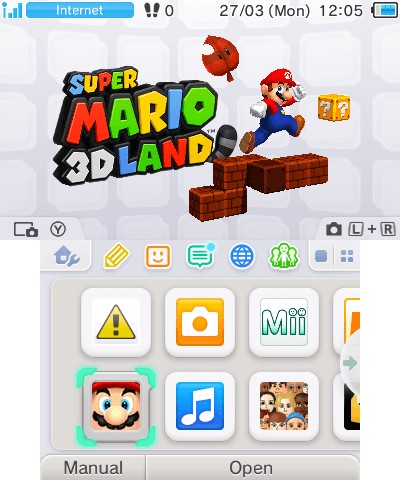
The HOME Menu with some apps installed. On this occasion, I also had the game cartridge of Mario Land inserted.
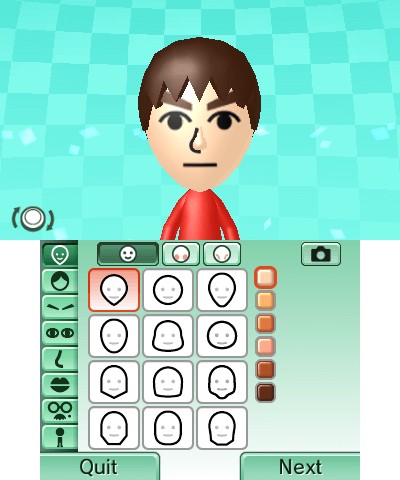
The Wii 'Miis' have made it into the 3DS.
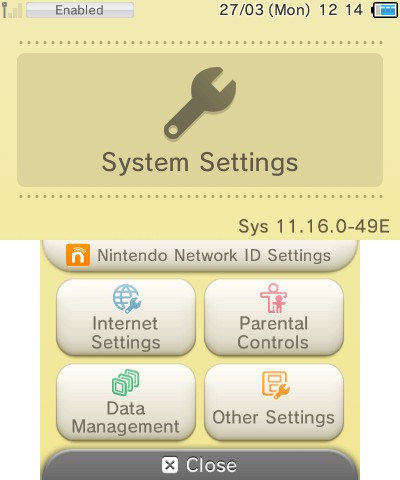
The Settings app.
In terms of user interface design, I'm inclined to say there are many patterns borrowed from the Wii System Menu, yet ported to a dual-screen portable system. The HOME Menu (name of the interactive shell) uses a 1-page navigation system where every installed application is shown on a scrollable grid. Except for a few shortcuts here and there, every service is an application to be launched.
Now, being a Nintendo product, you can expect a special focus on creativity and attention to detail. Families are the target audience, nevertheless, adults are the ones paying, and Nintendo knows that.
Maintaining consistency
The NS module is not only responsible for launching the interactive shell, it also offers 3DS software with the ability to invoke routines to handle certain interactions. One example is the 'Back to HOME Menu' overlay, which must be shown whenever the user presses the 'HOME' button.
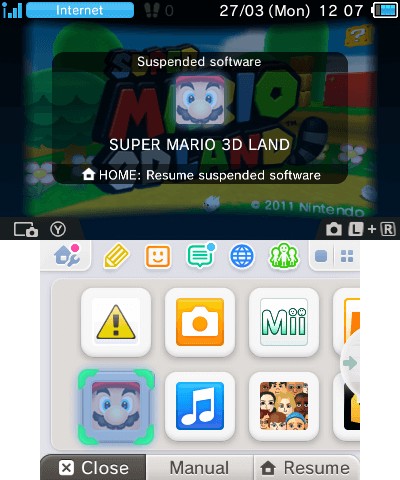
Users can press the 'HOME' button midgame, this will reinstate the HOME Menu without closing the current application. This event is handled by the running application but the routines are provided by the NS service.
Furthermore, 3DS software may also invoke 'mini applications' for attending other events (i.e. show the virtual keyboard), these are known as Applets .
Both sets are a crucial dependency for all applications, as they are responsible for properly reacting to external events consistently. Interestingly enough, since Applets and NS routines are not part of the game itself, in the case of New 3DS systems, even if a game is running in compatibility mode (that is, with all the 'New' hardware disabled), they will still be executed using the full extent of hardware, giving a small performance boost to unoptimised 3DS games.
The legacy shell
Whilst the special firmware includes the old BIOS routines DS/GBA games will expect, there's no DS or DSi shell in sight.
The old Wi-Fi setup screens (invoked by DSi and DS games) are the only exceptions. Interestingly enough, while the original DS Wi-Fi settings are useless (as they can only connect to WEP-protected access points), the DSi counterpart (accessed from DSi and 'DSi enhanced' DS games) can alter the 3DS' Wi-Fi settings. Yet, these games bundle an old Wi-Fi driver that only worked with the real DSi (the 3DS contains an Atheros AR6014 while the DSi came with an Atheros AR6002 or AR6013). So, to tackle this, both Wi-Fi settings are automatically synced when the firmware boots up .
Updatability
Well, of course, an updatable system is pretty much a requirement, not only for providing new functionality but also from a security perspective.
You can update the system software either online or through a game cartridge. Confusingly enough, both contain different update packages. Game cartridges only bundle system updates without the updated user apps, whereas network updates include everything . Consequently, version names encode a mix of the two, in case the user used both channels.
To install updates, the NS service reboots into SAFE_FIRM, where the System Updater takes care of this process .