Graphics are generated by a proprietary chip called the Picture Processing Unit (PPU). This is one of the chips that gives the NES an identity. To put it another way, since anyone could pick up a 6502 at a hardware store, why is the NES any different from, say, an Apple II or a Commodore 64? Well, what distinguishes the NES from other machines are the chips that surround the CPU: the PPU and the APU. These make up the NES' unique graphics and audio capabilities, respectively.

The European/PAL PPU chip on my NES' motherboard.
That being said, the PPU renders 2D graphics called sprites and backgrounds, outputting the result to the video signal.
Organising the content

Memory architecture of the PPU.
To render something on the screen, the PPU must know which graphics to draw, where on the screen to place them, and how to draw them (i.e., which palette to use).
To answer these questions, the PPU came pre-programmed with a different memory layout that looks for specific types of data:
- Graphics data is pulled from the game cartridge, which contains a dedicated chip called Character memory that stores the 2D drawings (called tiles) organised into a data structure named Pattern table. Character memory materialises in the form of 'Read-Only Memory' (ROM) or 'Random-Access Memory' (RAM), depending on whether the game ships with an immutable set of graphics or the CPU must intervene, respectively.
- The PPU addresses up to 8 KB of Character memory organised into two groups of 4 KB each.
- Meta-data telling the PPU 'where' and 'how' to draw graphics is found in other areas:
- The motherboard houses 2 KB of SRAM specifically for graphics-related data. Nintendo calls this space Video RAM (VRAM), and it stores two data structures called Nametables.
- The PPU embeds 256 bytes of Dynamic RAM (DRAM) to store the Object Attribute Memory (OAM).
- Lastly, the PPU also bundles 4 bytes of memory to define colour palettes.
Don't worry about the new terminology; the meanings of these data structures are discussed step by step in the following paragraphs.
Constructing the frame
The PPU generates frames with a fixed dimension of 256 x 240 pixels . It updates 60 times per second (60 Hz) on NTSC systems, and 50 times per second (50 Hz) on PAL systems.
As with its contemporaries, this chip is designed for the behaviour of a CRT display. There is no frame-buffer as such: the PPU will render in step with the CRT's beam, producing rows of pixels as scan-lines on the fly. The succession of scan-lines forms the image seen on the screen.
This methodology is quite complicated to dissect, so for this part, we'll look at it from the perspective of the programmer.
The frame output by the PPU is composed of two different layers. For demonstration purposes, let's use Super Mario Bros. to show how this works:
Tiles

Two pattern tables with multiple tiles squashed together.

A single tile.
To begin with, the PPU uses tiles as a basic ingredient for producing sprites and backgrounds.
The NES defines tiles as basic 8x8 pixel maps, these are stored in Character memory (residing in the game cartridge) and organised into a big data structure called Pattern Table . Each tile occupies 16 bytes, and a Pattern table houses 256 tiles . Since the PPU addresses up to 8 KB of Character memory, it can access up to two Pattern tables.
Inside a tile, each of its pixels is encoded using a 2-bit value, which references one of four colours from a palette. Programmers can define up to eight palettes (four for the background and four for sprites). The colours referenced on each palette point to a 'master palette' consisting of 64 colours , representing all the colours that this console can produce. Each palette is made of four colours, with one reserved for transparent.
To start drawing something on the screen, games populate a set of tables with references to tiles stored in Character memory. Each table is responsible for one layer (sprite or background) of the frame. Then, the PPU reads from those tables and composes the scan-lines that will be beamed by the CRT gun.
I will now explain how each layer/table works and how they differ in terms of functionality.
Background Layer

Visualised background map.

Visualised background with selected area marked.
The background layer is a 512x480 pixel map containing static tiles . You may recall that the viewable frame is much smaller, so the game decides which part of the layer is selected for display. Games can also shift the viewable area during gameplay; that's how the scrolling effect is accomplished.
To save memory, groups of four tiles are combined into 16x16-pixel maps called blocks, in which all tiles share a colour palette.
Nametables (stored in VRAM) specify which tiles to display in the background layer. The PPU looks for four 1024-byte Nametables, each one corresponding to a quadrant of the layer. However, only 2 KB of VRAM is available! Meaning that only two Nametables can be stored without additional hardware provided by the cartridge. Yet, the remaining two still have to be addressed somewhere: most games simply point the remaining two where the first two are (this is called mirroring).
Although this architecture may seem flawed at first, it was designed to minimise costs while ensuring simple expandability: if the game requires a wider background, just fit extra VRAM in the cartridge.
Moving on, the last bytes of each Nametable store a 64-byte Attribute table that specifies which colour palette is assigned to each block .
Sprite Layer

Rendered sprite layer.
Sprites are tiles that can move around the screen. They can also overlap one another, or appear behind the background. The viewable graphic is determined by its priority value (similar to the concept of 'layers' in traditional graphic design software).
The Object Attribute Memory (OAM) table specifies which tiles will be used as sprites . In addition to the tile index, each entry includes an (x,y) position and several attributes (colour palette, priority and flip flags). This table resides in a 256-byte DRAM located within the PPU chip.
The CPU can populate the OAM table, but this process can be slow in practice and risks corrupting the frame if not timed correctly. As a result, the PPU contains a small component called Direct Memory Access or 'DMA' which can be programmed (by altering the PPU's registers) to fetch the table from WRAM. With DMA, the table is guaranteed to be uploaded when the next frame is drawn; however, the CPU will be halted during the transfer!
The PPU is limited to eight sprites per scan-line and up to 64 sprites per frame. Luckily, the scan-line limit can be partially circumvented thanks to a technique called 'OAM order rotation', in which the game manually alters the order of entries in OAM. This makes the PPU render a different sprite set at each frame, and the speed of the CRT beam will trick the user into seeing more sprites than allowed. However, they will also appear to flicker on-screen.
Background Split

Rendered background layer highlighting the two portions with different scrolling values defined. Only the second portion scrolls as Mario moves.
Before we move on, there's an additional detail worth mentioning. If you play Super Mario Bros, you'll notice that when Mario moves, the scene scrolls without a hitch. However, you'll also observe that the top area (where the stats are) remains static even though both portions belong to the same background layer! So, what is happening here? Well, the game is altering the scrolling values mid-frame to show the overworld and the stats (residing in a fixed portion of the background) at the same time. The NES doesn't provide this feature natively, but the game deduces the timings by observing the state of the PPU (manifested through its status register ).
To accomplish this, games use a technique called Sprite 0 Hit. Super Mario Bros instructs the PPU to render a dummy sprite behind the coin, this happens to be the first sprite drawn within the frame. After the PPU beams it, it updates its status register with a flag to indicate that the first sprite (a.k.a 'sprite 0') has been drawn. Meanwhile, the game continuously checks mid-frame whether the sprite 0 status has been flagged (a.k.a 'hit'). When this occurs, the game updates the scrolling value of the background table to align it with Mario's position.
Overall, 'Sprite 0 Hit' is a very delicate procedure, as it's easy to mess up the timings (sprite 0's flag is not cleared after polling it, which leads to 'duplicated' positives ). Furthermore, as this routine repeats indefinitely, it can be quite costly (in terms of CPU cycles) to execute. On the bright side, later mappers took over this function by employing automatic interrupts that are triggered whenever an arbitrary scan-line is hit (a much more efficient technique), which significantly improved the visual capabilities of Super Mario Bros 3, for instance.
Result

Tada!
Once the frame is finished, it's time to move on to the next one!
However, the CPU can't modify any table currently in use by the PPU, otherwise, artefacts may show up on the screen. So, when all scan-lines are completed, the PPU triggers the Vertical Blank (V-Blank) interrupt on the CPU . This notifies the game that it can start updating the tables without tearing the picture currently displayed. At that moment, the CRT's beam is pointing below the visible area of the screen, into the overscan (or bottom border area).
Only a handful of PPU registers can be updated outside the V-Blank window , which explains the ability to scroll the background layer mid-frame.
Outputting the image
Now that we've seen how NES graphics are constructed, let's look at how they are sent for display.
Just as programmers implement a game by programming the CPU, the PPU generates images by controlling the CRT's beam. The main difference, however, is that the beam cannot be directed arbitrarily. Its circuitry follows an analogue standard, such as PAL or NTSC, which sets the rules the PPU must follow to send its frames.
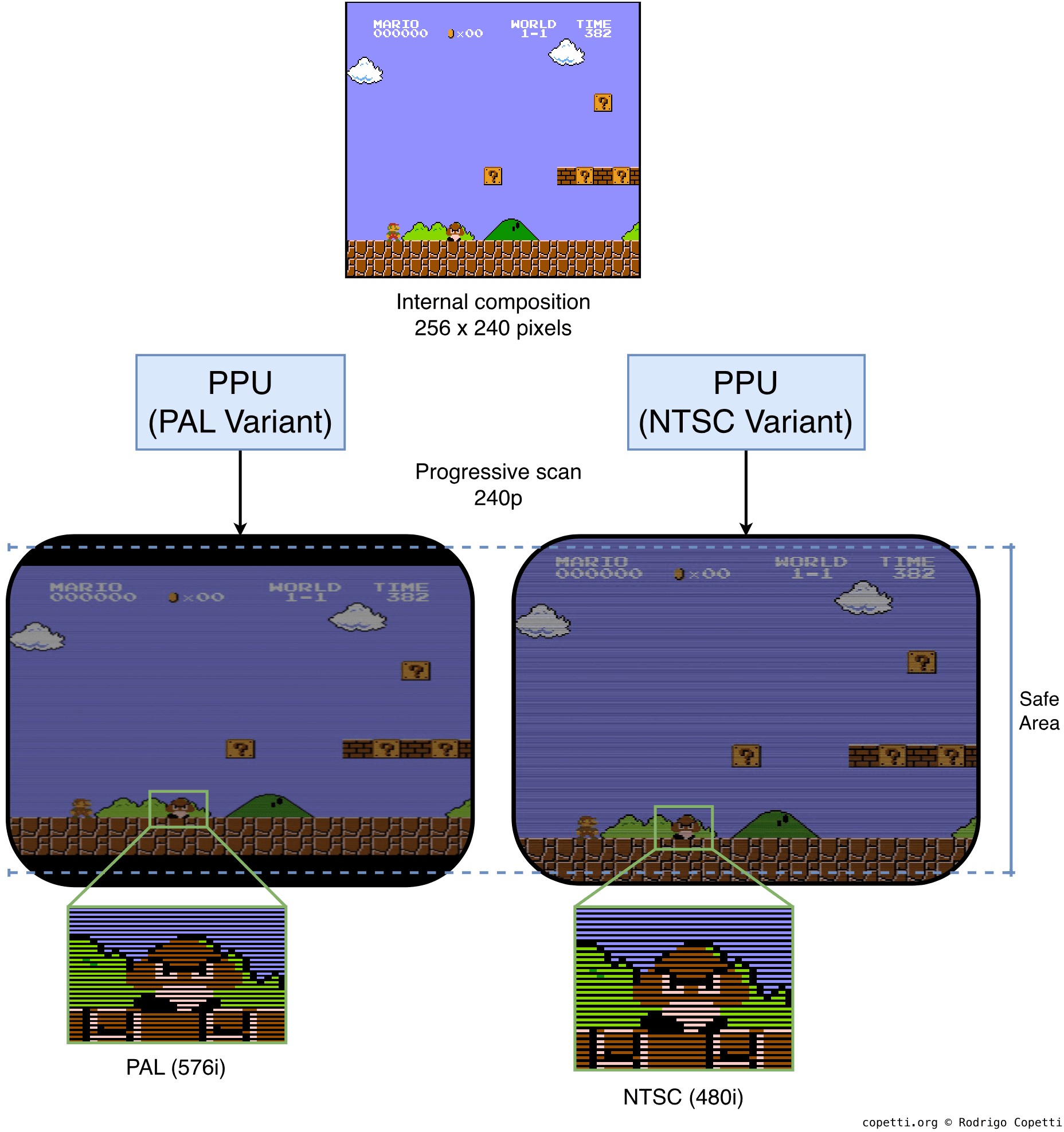
A quick illustration of how the PPU broadcasts a frame using a 240p signal. Depending on the region, the output follows either the PAL or NTSC standard. Not shown here are the colour differences and refresh rate between NTSC and PAL.
Due to the lack of a unified standard, the same image varies in appearance depending on the region and the television on which it is displayed. To give a quick summary:
- Unlike LCD panels, CRTs have no concept of a fixed pixel grid. A pixel row in the PPU is encoded as a scan-line containing evenly timed samples; these modulate the beam as it traverses the phosphor screen.
- The NTSC standard dictates that a frame takes 525 scan-lines to compose . However, only 480 are visible (hence the name '480i'); the remainder are consumed by the vertical blanking period. In the case of PAL, there are 625 scan-lines, of which 576 are visible (hence '576i').
- Both NTSC and PAL were designed for bandwidth-constrained systems: affordable equipment wasn't capable of transmitting all scan-lines in one sweep. So, frames are split into two passes: one draws odd scan-lines and the other draws even ones. The beam travels so fast that the human eye perceives a single image, albeit a bit shimmery. This methodology is called interlaced video.
- Even with this in mind, consumer CRT TVs differed significantly in quality and precision. For this reason, broadcasters assumed that a portion of the picture around the edges (around 10%) would be hidden by the TV's bezel. The hidden area is called overscan.
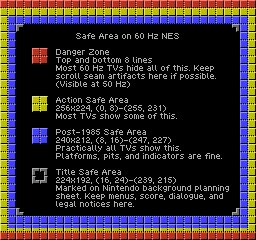
Test frame output by the PPU.
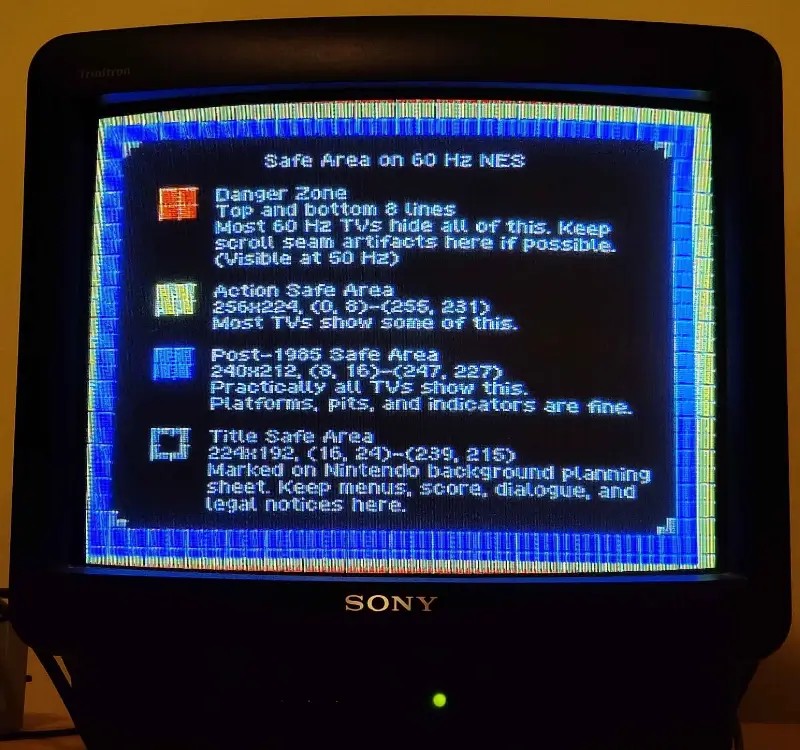
Same frame displayed by a Sony Trinitron TV. Notice the edges being irregularly covered by the bezel. Thanks to Christopher Rivett for providing this photo.
Now, to combine this with the PPU's inner workings:
- Take a look at the PPU's resolution again. It's not a coincidence that its vertical resolution is half the number of visible scan-lines in NTSC: the PPU outputs 240 scan-lines per frame without interlacing. In other words, 240p. Nevertheless, its choice of horizontal resolution, when considered alongside the TV's 4:3 aspect ratio, makes the pixels appear stretched horizontally. Moreover, the lack of interlacing creates gaps between scan-lines (this is the origin of the famous 'scan-line effect').
- Broadcasting frames in one sweep is known as progressive scanning. This type is also favoured by LCD panels.
- Due to overscan, programmers had to assume that only ~224 pixel rows would be properly visible. This affected where elements would be placed in the game; the outer regions were considered 'danger zones'.
- PAL tellies, on the other hand, expect more scan-lines. The PPU still outputs 240p. As a result, this leaves unused vertical space, appearing as horizontal black bars (letterboxing).
Secrets and limitations
If you're thinking that a frame-buffer system without dependence on the CRT would have been preferable: extra RAM allocated to store the full frame would have been prohibitively expensive, and the console's goal was to remain affordable. Let me now show you why this design still proved to be both efficient and flexible.
Multi-Scrolling

In this level of Super Mario Bros. 2, the Nametable is set up for vertical scrolling (horizontal mirroring).

With Super Mario Bros. 3, Mario can run and fly. Thus, the PPU needs to scroll diagonally. Notice the right edge is showing the wrong colour palette, and the left edge has a mask applied.
Some games require the main character to move vertically; therefore, the nametable is set up with horizontal mirroring. Other games need their character to move left and right, and so implement vertical mirroring instead.
Either type of mirroring allows the PPU to update background tiles without the user noticing, as there is ample space to scroll while new tiles are being rendered at a distance.
But what happens if the character needs to move diagonally? The PPU can scroll in any direction; however, without extra VRAM, the edges are forced to share the same colour palette (remember that tiles are grouped in blocks).
This explains why some games like Super Mario Bros. 3 show strange graphics at the right edge of the screen while Mario moves (the game is set up for vertical scrolling) . It's possible that they needed to minimise the hardware cost per cartridge, as this game already bundles a powerful mapper.
As an interesting fix: the PPU allowed developers to apply a vertical mask on top of tiles, effectively concealing part of the glitchy area.
Tile-Swapping

Early scan lines.

Late scan lines.

Actual frame displayed to the user.
Another remarkable feature of Super Mario Bros. 3 is the number of graphics it can display.
This game displays more background tiles than strictly permitted. How does it achieve this? By taking two screen captures at different times while the display is generated, we can see that the final frame is actually composed of two distinct frames.
This is another wizardry of the MMC3 mapper, which not only addresses extra space in the Program ROM, but also extends the Character ROM space by connecting two separate Character chips. By determining which part of the screen the PPU is requesting, the mapper redirects to one chip or the other, thereby allowing more unique tiles on-screen than was originally supported .
Curious behaviour
Throughout my research, I came across many interesting articles that explain unusual behaviour of the PPU, so I thought to mention a few here:
- Unlike the Master System's VDP, which generates RGB colours that are subsequently encoded into NTSC/PAL signals for broadcasting, the NES' PPU does all at once . Hence, there isn't a one-to-one correspondence between the colours of the PPU master palette and the standard RGB colourspace (widely adopted by present technology). This leaves some room for interpretation and, as a consequence, various emulators may display a different palette.
- The discrepancies between RGB palettes can be observed using Tim Worthington's DIY kit, which adds RGB signal output to the NES. This also houses a switch to choose between three predefined palettes .
- The master palette contains a 'cursed' colour (
$0D), which might disrupt the NTSC TV signal . Well, what happens is that some TVs mistake the signal for displaying that colour as the blanking signal, which may cause flickering. - The PPU relies on DRAM to store its Object Attribute Memory (OAM). Now, unlike SRAM, DRAM must be refreshed constantly to prevent data loss. Conversely, the PPU doesn't refresh DRAM when it's not rendering the frame . This typically occurs during vertical blanking. For this reason, it is advised to always update OAM during vertical blanking, since the non-refreshing period (happening during V-blank) will have corrupted part of the table.
- The PPU variant for PAL systems is unaffected by this, as it does refresh during V-Blank (which lasts longer on PAL systems).