There is a 128 KB 'System' ROM found on the motherboard ; this serves as the typical BIOS, providing:
- A bootloader to initialise the hardware, perform a self-test, and bootstrap the splash animation.
- A configuration shell (only on MVS models).
- Various system routines that abstract hardware operations.
The visual services
After powering on the console, the user will notice a splash screen known as the Eyecatcher . Its code is stored in the System ROM, but the graphic assets (the Neo Geo logo and other labels) are fetched from the cartridge's C ROM and S ROM.
Alternatively, the P ROM header may contain a flag instructing the System ROM to delegate the splash routine to the cartridge . This only works on the AES variant , yet later games adopted this to display different text.
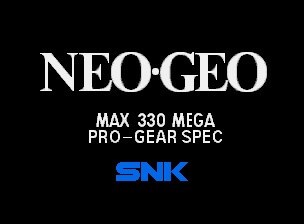
The Eyecatcher implemented by the System ROM. It still relies on tiles supplied by the cartridge. The official implementation displays the characteristic 'Max 330 Mega' subtitle, as a way to show off the theoretical storage capacity of Neo Geo cartridges. Later games, through the use of the flag, render 'Giga Power' instead.
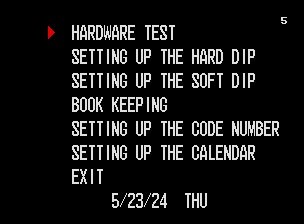
The Test Menu, showing many maintenance functions required to set up the arcade cabinet.
The MVS system also provides a Test Menu to configure the cabinet (e.g., adjust the calendar, test the components, etc.). This menu is triggered by flipping one of the DIP switches of the MVS (inaccessible to the end user). Consequently, its motherboard bundles an S ROM that stores the Fix tiles for this menu.
The System routines
Apart from the visual aspects, the System ROM provides software routines to operate the hardware. This includes:
- Reading button presses from the controllers and, in the case of the MVS, the coin slots.
- Accessing the Memory Card.
- Initialising VRAM with the proper structure for the sprite blocks and the Fix tile map.
Interestingly enough, system routines may, in turn, call game routines to continue some operations. This means games are also tasked with implementing certain calls . For instance, the System ROM may request the following from games:
- Show the custom Eyecatcher animation (if the required flag is set).
- Show the game's boot animation.
- Start the game demo. This is what you see before inserting a coin.
- Play the 'coin inserted' sound.
- Begin the game after enough coins are inserted.
As you can see, most of the low-end I/O is delegated to the System ROM; games instead focus on providing their unique content.