It seems that this generation is putting a lot of work into expandability and accessories, the GameCube included a couple of new interesting ports, although some of them remained unused.
Internal I/O
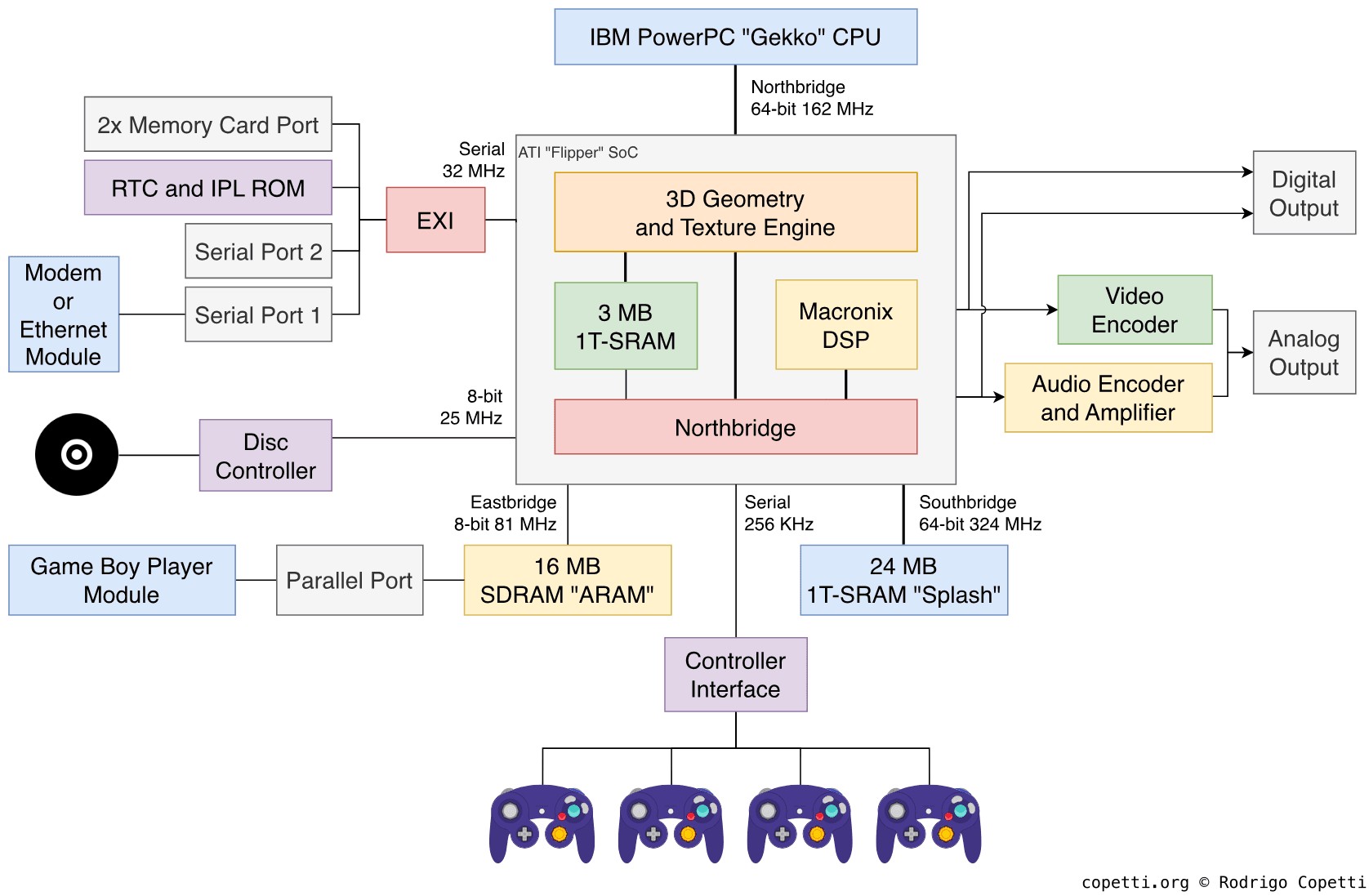
Main diagram of the GameCube's architecture. In there, we find the 'Northbridge' which controls most of the I/O.
Flipper is in charge of interfacing the CPU with the rest of the components so, apart from including sound and graphics circuitry, it also provides a collection of hardware named Northbridge that is composed of :
- Audio Interface or 'AI': Connects the Audio Encoder.
- Video Interface or 'VI': Connects the Video Encoder.
- Processor Interface 'PI': Connects the CPU (Gekko).
- Disk Interface or 'DI: Connects the DVD controller, which can be considered an independent computer per se.
- Serial Interface or 'SI': Connects four possible controllers using a proprietary serial protocol.
- External Interface or 'EXI': Connects the external accessories (more explained below), Memory Card and the IPL BIOS along with the Real-Time Clock or 'RTC'. It uses an SPI-like protocol to connect these devices using only one serial node.
Each interface exposes a set of registers to alter some of its behaviour.
Optional I/O
On the bottom of the GameCube's case, you'll find two external sockets to connect some widgets.

Covered accessory slots on the bottom of the case.

Uncovered accessory slots on the bottom of the case.
Both are technically identical (serial bus running at 32 MHz), yet they are presented with a distinct external shape to accommodate different accessories:
- Serial Port 1: Nintendo shipped Modem and Broadband adapters for this slot.
- Serial Port 2: No public accessory shipped using this port, but you may find some third-parties accessories that provided debugging tools.
These ports are operated on the EXI stack.
Unusual I/O
You'll notice I still haven't mentioned another available socket found next to the serial ports: The Parallel Port. This port happens to be much faster (8-bit at 80 MHz vs 1-bit at 32 MHz) which may be the reason Nintendo called it Hi-Speed Port. But the most unusual part is that this port is not interfaced through EXI, but through ARAM!
The only official accessory known to date is the famous Game Boy Player which plugged in as an extra floor under the GameCube, it contained the necessary hardware to natively play Game Boy and Game Boy Advance games. The Player works by doing all the heavy work itself and then sending the results (frames and audio data) to ARAM which the GameCube forwards to the respective components for display/sound.
Consistent design
I found it worth pointing out that no matter how many accessories you connect, the console will always keep its cubic shape (or at least attempt to).