The motherboard contains 2 MB of 'System ROM', which stores a 'Basic Input/Output System' (BIOS). This is the first location from which the CPU reads when starting up. The ROM contains code that instructs the CPU to either bootstrap the game or load the interactive shell.
Furthermore, the BIOS also contains routines that games may use to simplify I/O operations , such as reading from the GD-ROM drive.
Boot process

The popular red-tinted Dreamcast logo.

Europeans got a blue swirl instead.

The licence screen. Some games also appended their logos alongside Sega's.
When the SH-4 CPU gets power, it looks for a program at address 0xA0000000 . On the Dreamcast, this points to the 2 MB of System ROM , meaning the system will follow these steps :
- BIOS stage.
- Execute the BIOS bootloader, initialising the hardware in the process.
- Display the iconic Dreamcast splash animation.
- IP.BIN stage.
- Check for a valid disc (GD-ROM or MIL-CD) in the drive. If one is present, read the metadata sectors (called
IP.BIN); otherwise, skip to the 'No-disc' stage.- At some point, the drive authenticates the security ring on GD-ROMs, presumably after identifying the disc as a GD-ROM and before reading
IP.BIN, although it's not publicly known exactly when this occurs.
- At some point, the drive authenticates the security ring on GD-ROMs, presumably after identifying the disc as a GD-ROM and before reading
- Using the contents of
IP.BIN, verify that the disc matches the console's region. - Validate and display the 'SEGA' licence screen stored in
IP.BIN.- A custom 'MR' image can also be bundled to display a logo below SEGA's . It may be up to 320 x 90 pixels in size.
- This was a classic leverage of trademark laws to control distribution.
- Execute the initialisation code stored in
IP.BIN.
- Check for a valid disc (GD-ROM or MIL-CD) in the drive. If one is present, read the metadata sectors (called
- 1ST_READ.BIN stage.
- With the hardware ready, load the game's entry point (called
1ST_READ.BIN) from the disc into memory and execute it. Behind the scenes, the exact loading process varies depending on the type of disc. I explain this in more detail in the 'Games' section. - The game is now in control.
- With the hardware ready, load the game's entry point (called
- No-disc stage.
- When the disc is not inserted or invalid, the BIOS loads the interactive shell.
- The user is now in control.
Interactive shell
Much like the Sega Saturn, when there is no valid game disc inserted, the console launches a visual shell.
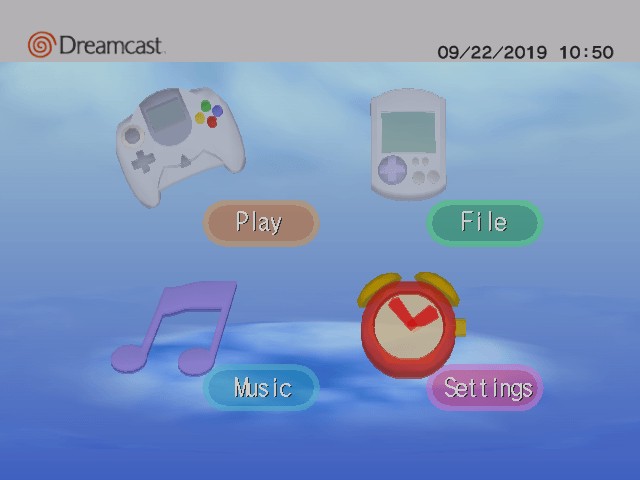
Home screen.
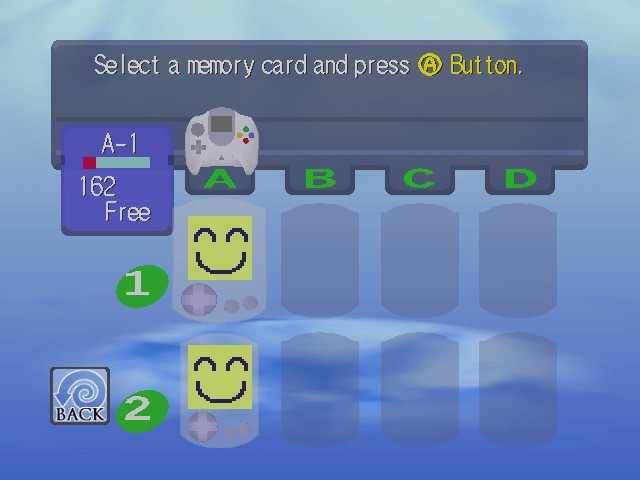
VMU manager.
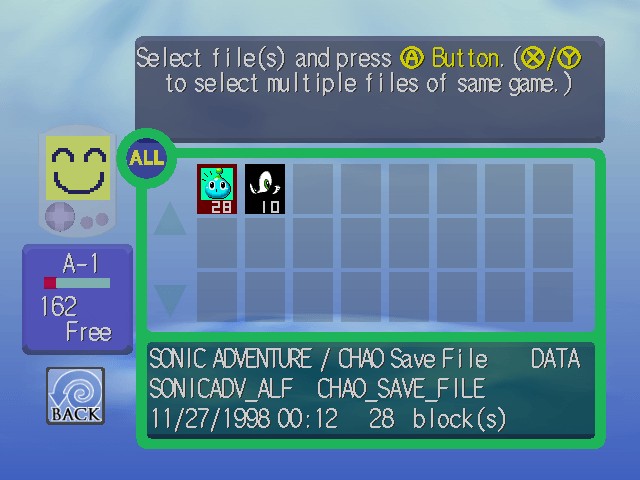
Saves manager.

Audio player.
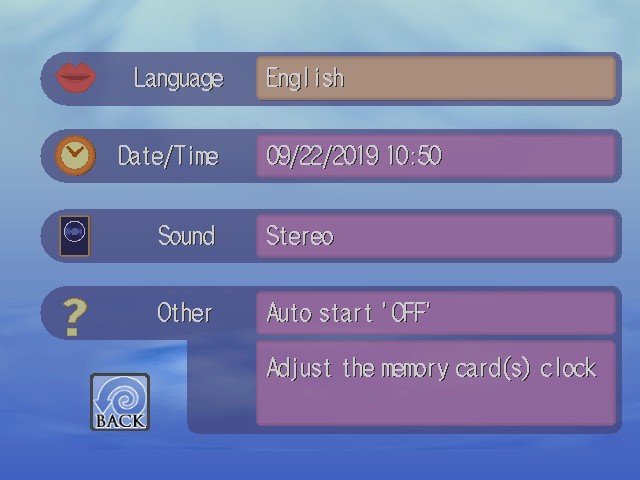
Settings screen.
The shell provides a simple graphical user interface that enables the user to perform basic but essential tasks, including:
- Starting the game, if it hasn't already.
- Managing the save data stored on the VMU (this device is described in more detail later).
- Playing music from an Audio CD, if one is inserted.
- Tweaking certain settings like the date, time, sound and, so forth.
Windows CE
Ever since the Dreamcast's announcement, Sega and Microsoft revealed that the console could run Windows CE . In fact, you only have to look at the console's front to notice a Microsoft stamp... So, what's going on here?

The Windows CE seal on the front of the console. Coincidentally, you may find similar labels on other handheld equipment from the same era.
First things first, what exactly is 'Windows CE'? Well, it was one of the many projects Microsoft embarked on during the mid-90s to conquer territories beyond the conventional PC market. In the wake of more efficient CPU architectures than x86 and the emergence of handheld computing, a new team at Microsoft was tasked with bringing the Windows ecosystem to those new devices .
This led to the creation of Windows CE: a complete operating system, developed from the ground up, that provided a subset of the existing Windows APIs, development tools, and services.

Windows CE 3.0 (2000), bundled with a desktop interface and a couple of business apps.
Unlike Windows 95 or NT, the new operating system presented the following advantages:
- It ran on a wide range of CPU architectures , including the SuperH and even the NEC/MIPS VR4300, which was adopted by the Nintendo 64.
- It was designed with constrained hardware in mind, such as limited power sources (AA batteries), memory (2 MB of RAM) and storage (4 MB of ROM).

An HP Palmtop PC 360LX (1997) running Windows CE 2.0. I found it lying on a table at The Centre for Computing History (Cambridge, UK) during my visit in August 2024. Coincidentally, this palmtop houses an SH-3 CPU!
Moreover, Windows CE was sold as a set of building blocks for manufacturers, allowing them to cherry-pick which components to bundle. Manufacturers could then integrate it into a variety of hardware (such as handhelds, point-of-sale terminals, and even automotive systems). Nevertheless, Windows CE gained significant notice as the OS powering palmtops (the precursors to PDAs), effectively competing with the Apple Newton and Palm.
As the cellphone industry surged throughout the late 90s, Microsoft leveraged Windows CE's modularity to develop PocketPC, another operating system (later renamed Windows Mobile) focused entirely on PDAs and mobile phones.

Windows CE 2.11 'Palm-size PC Edition' 1.2 (1999).
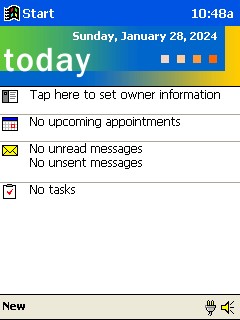
PocketPC (2000), based on Windows CE 3.
Now, what does all of this have to do with the Dreamcast? At some point, Microsoft and Sega ventured the idea of producing a Windows CE package for the Dreamcast . After all, Windows CE was already running on top of Hitachi's CPUs. In the end, this didn't materialise into a full desktop interface or integration with Microsoft's online services. Instead, it served as an optional layer of abstraction to simplify hardware operations.
Similar to what Nintendo provided with the Nintendo 64, Microsoft shipped an SDK (commonly referred to as Dragon SDK), based on Windows CE, for developing applications on the Sega Dreamcast. The libraries comprised a subset of CE with the minimal components needed to assist with graphics, audio, and debugging. As part of 'joining the Microsoft club', developers could now make use of Microsoft's star IDE (Visual Studio 6.0) and Visual C++ 6.0.
Some developers found this option very attractive. Since the audio/graphics framework included with CE was none other than DirectX 6, plenty of PC games could, in theory, be easily ported to the Dreamcast. However, the architectural differences between the Dreamcast and conventional PCs were too great to ignore. So, in the end, programmers had to go through a great deal of optimisation to reach optimal performance . Furthermore, since the Dreamcast's BIOS didn't include any of Microsoft's frameworks, the SDK had to be statically linked with the game. Thus, compared with Sega's closer-to-metal libraries, Dragon SDK increased the game's loading times (after all, a separate 'OS' had to be loaded from the game disc) and, throughout execution, the Windows CE layer happened to eat a substantial amount of resources.

The licence screen of 'Q-Bert', denoting the use of the Windows CE SDK (pretty much the only visible feature of Windows that users would notice).
In conclusion, 'Windows CE for Dreamcast' was merely a secondary SDK of choice for developers. Nonetheless, a considerable number of Dreamcast games ended up making use of it.
If you're curious about the fate of Windows CE and Windows Mobile, things didn't go particularly well for Microsoft in the handheld market. Windows CE was abandoned in 2013. The year before, the CE-based core of Windows Mobile was replaced with Windows NT (aligning it with the desktop-based Windows 8). Nevertheless, Windows Mobile eventually lost ground to newer platforms (Android and iOS) and was discontinued in 2019.