Development was mainly done in C or C++. At first, C was the recommended choice since the available C++ compilers were very limited in both functionality and quality.

My European copy of Sonic Adventure... stamped by the Australian authorities.
Sega also supplied development hardware in the form of a PC-like tower known as the Sega Katana Development Box. This housed Dreamcast hardware with enhanced I/O for debugging. It also shipped with a CD containing the official Katana SDK, intended for PCs running Windows 98.
As mentioned before, developers could also choose to adopt Microsoft's Dragon SDK on top of Sega's frameworks. In that case, DirectX 6.0 and Visual C++ 6.0 were also available for development.
A familiar, but denser, medium
It seems the popular 650 MB CD-XA discs weren't enough for this generation anymore, prompting Yamaha and Sega to develop a proprietary variant called 'GD-ROM' that could now store around 1 GB of data.
Unlike ascending standards like the DVD, GD-ROM was a cheaper option by retaining the same laser used to read CDs, but improving the surrounding electronics to be able to extract more data from the same space.
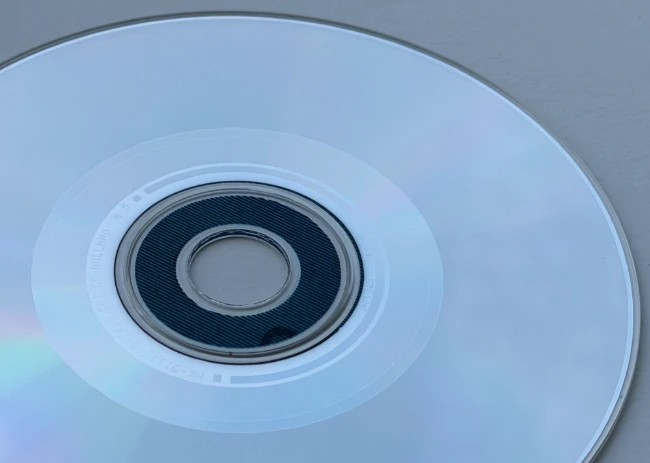
A close look at the GD-ROM, showing the clear distinction between the sparse inner zone and the denser outer zone. In between them lies a thin security ring.
Not a lot is known about the GD-ROM as Sega kept the protocol for themselves. What is known, however, is that GD-ROMs are divided into three zones :
- Inner Zone (35 MB): It contains metadata about the disc (allowing the Dreamcast to recognise the GD-ROM) followed by an audio track warning users if they inserted the disc into non-Dreamcast equipment. This zone intentionally follows the CD-ROM standard, making it backwards compatible with existing CD players.
- Outer Zone (984 MB): This is where the game data is stored. The larger capacity came from narrowing the distance between pits and lands.
- Security Ring: Sitting between the inner and outer zone, its engraving is meant to prove the disc is genuine. There's not enough documentation publicly available to explain how it works, but what's known is that the drive always verifies this area before reading the outer zone.
The speed of the reader is 12x, which is not too shabby compared to Saturn's 2x CD reader. Nevertheless, it's worth mentioning that the new reader operates at Constant-Angular-Velocity (CAV), as opposed to Constant Linear Velocity (CLV). This means that, with little effort, data access gets faster on the outer edge, which is coincidentally where the game data resides.
The bonus format
The Dreamcast also debuted another disc format: the Music Interactive Live-CD (MIL-CD); this was another creation of Sega that merely extended the standard Audio CD with interactive programs .
Whereas conventional CD players would only find audio tracks on a MIL-CD, the Dreamcast was able to 'enhance' the experience by displaying video, lyrics, and interactive menus. I'm guessing karaoke was its primary application.
In any case, the format didn't attract enough attention. That is, until piracy groups found another use for it... The story continues in the 'Anti-Piracy & Homebrew' section.
The ambitious online platform
Sega had been a trailblazer in dial-up services since the Mega Drive/Genesis era, initially through separate modem accessories and games that could take advantage of online content; but as the hardware improved, new types of services could now be offered on the net. It's worth noting that the late 90s coincided with the end of the walled-garden era, as the once-isolated servers connected over the telephone line gradually opened up to an emerging web of interconnected networks known as the 'Internet'.

The Dreamarena portal, the entry point for (some) European users who wanted to join the online experience. All in all, Dreamarena was an attempt to bring the internet into the living room.
For the Dreamcast launch, Sega pre-equipped the console with a 33.6 kbit/s modem module (or a 56 kbit/s variant in America!), paving the way for users to subscribe to an Internet Service Provider (ISP) for enhanced gaming. In there, the Dreamcast could find:
- Web browsing, chat rooms, and email.
- Online multiplayer (dependent on dedicated servers maintained by game studios).
- Downloadable content (stored on the VMU, the console's 'memory card').
However, the implementation and deployment of this functionality were highly decentralised and chaotic: Sega relied on local ISPs to supply the infrastructure and services, resulting in turbulent changes throughout the console's lifespan. To give you an idea of the panorama:
- In North America, users could choose their ISP. Later, SegaNet appeared as a Sega-branded ISP, offering a single subscription package (with bonus content) for a monthly fee .
- In Europe, the console was hardcoded to a regional ISP, but enjoyed a common service called Dreamarena . This was rolled out in phases with significant delays. Users in the UK paid only the cost of the call, whereas the price varied across the continent.
- Japan, like North America, allowed users to input a custom ISP, which would then connect to Dricas for services .
Players signed up to their local service using regional registration discs, such as DreamKey (for Europe) or Dream Passport (for Japan). These were often bundled with games and provided a tailored web browser (e.g. NetFront for Europe/Japan, PlanetWeb for the US) designed to register an account and browse the web. Later revisions of DreamKey finally allowed users to customise the ISP settings.

The DreamKey disc that came with my copy of ChuChu Rocket!.
Over time, however, players around the world found out that the advertised functionality (like online gaming) was not yet available or unreliable, prompting an unfortunate mention on the BBC program Watchdog . In extreme cases, like Australia and New Zealand, the delay in the ISPs' implementation impacted the release date of the console.
To improve customer satisfaction, Sega later shipped a Dreamcast-branded keyboard and mouse , in case users fancied surfing the net PC-style.
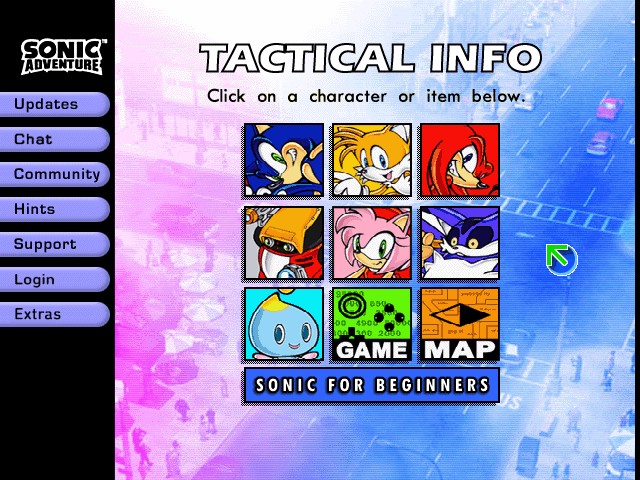
The home page offered plenty of content to explore.
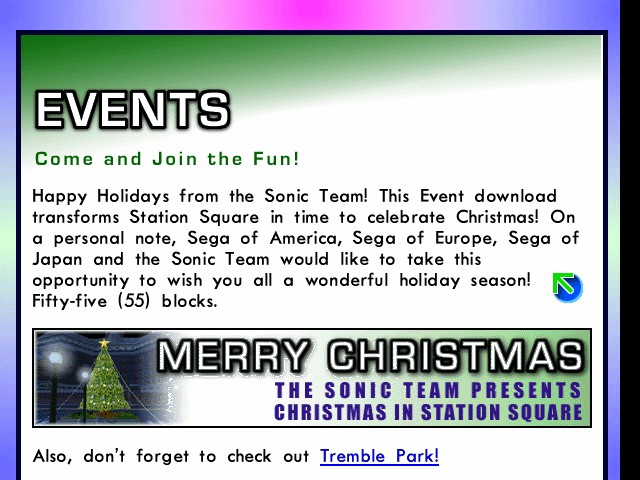
Sega used holiday events to offer extra content for the game.
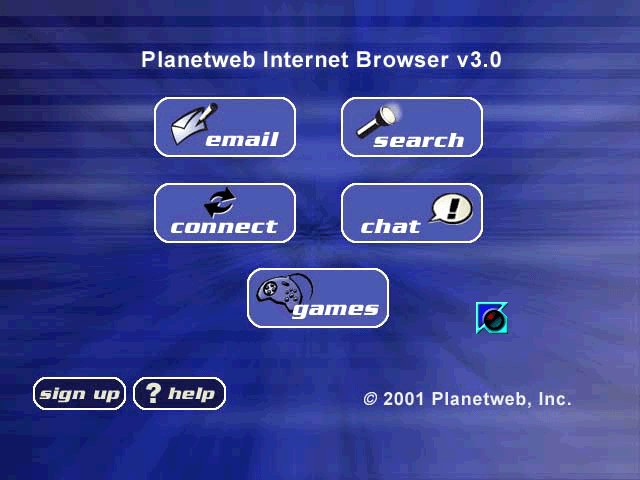
The home screen.

The web browser interface.
Whilst ambitious, the service reflected Sega's hopes of leading the fast-growing online gaming market. Ultimately, however, these offerings once again failed to convince enough users, and SegaNet and Dreamarena were discontinued two years after launch. The dedicated multiplayer servers slowly faded over the coming years, and with them, all online functionality bundled in games ceased to work.
A thriving restoration community
You may be interested to know that the present day paints a different attitude towards Sega's original venture. In recent years, an enthusiastic group has taken it upon itself to re-implement the defunct services, culminating in the following projects that have managed to restore most - if not all - of the original online experience:
- DreamPi, by Luke Benstead (a.k.a. Kazade), is a Raspberry Pi SD-card image housing software that recreates the physical layer of the Dreamcast-to-ISP connection . The console connects to the Raspberry Pi, which then acts as a bridge to the modern internet. This setup requires a USB modem adaptor with extra circuitry to replicate the Plain Old Telephone Service (POTS) protocol - that is, to simulate the behaviour of the analogue voice telephone line.
- This suite also includes Dreamcast Now, allowing players to advertise their online presence on a website of the same name.
- Dreampipe by Dan and Jial, hosts the original web portals used by games, including their downloadable content.
- DCNet, by flyinghead, provides a centralised set of community servers that restores online multiplayer functions .
- Communities such as SEGA Online, Dreamcast-Talk, and The Dreamcast Junkyard host guides and forums, while Dreamcast Live also publishes leaderboards, curated list of community servers, and patched games that can access said servers.
The interactive Memory Card

The Visual Memory Unit (VMU) .
Another innovative feature of the Dreamcast is the Visual Memory Unit (VMU), a small gadget that attaches to the controller and, aside from serving as a memory card, is a fully fledged system that houses :
- A Sanyo LC86K87: An 8-bit low-power CPU.
- A 48 x 32 monochrome LCD with four additional icons: Commanded using 196 B of eXternal RAM (XRAM) as a frame-buffer.
- Two serial connectors: One for each direction (input and output).
- Six physical buttons: Used to interact with the VMU when it's detached from the controller.
- A 16 KB Mask-ROM: Stores a dedicated BIOS-IPL.
- 64 KB of Flash: Split between 32 KB for storing a single program (uploaded from the console) and 32 KB for keeping save data (acting as a memory card).
- 512 B of RAM: 256 B is reserved for the system, leaving the remaining 256 B to the program.

Controller without VMU attached .

Controller with VMU attached .
The VMU has two modes of operation:
- Attached to the controller: The official controller has two slots for connecting VMUs and other accessories of the same form factor. If the VMU is inserted on the first slot (visible from the front of the controller), it can display drawings during gameplay. Moreover, the Dreamcast can store saves and upload a program on the VMU.
- Detached from the controller: The gadget becomes a Tamagotchi-like handheld with a clock and save manager, and can also run whatever program the Dreamcast previously transferred. If that wasn't enough, two VMUs can be connected to share content as well.